
Descripción
Professional Share is a free WordPress plugin that is optimized for the social media buttons that professionals and B2B companies need most. It’s optimized for speed and analytics with proper placements for posts and pages.
- Core buttons applicable to professionals and B2B – focus is on LinkedIn and Facebook action verb “recommend”. Drive quality traffic to your site while simplifying the user experience.
- Full Google Analytics Social Tracking. Google Analytics reports successful shares only. Tracks shares, recommends, AND unlikes.
- Official button code from LinkedIn, Twitter, Google, and Facebook.
- Schema.org and OpenGraph meta tags for more precise sharing.
- Allows Twitter username entry so Tweets can be attributed to you – (the AddThis plugin does not!).
- Plugin buttons can load once in the page speeding up the user experience.
- Buttons have flexible placements – above posts, below posts, above pages, below pages, and custom with shortcodes and the do_action function.
- Widgets for easy placement.
- Works on mobile, respsonsive designs and themes.
- Allows custom Facebook AppID and administrator IDs for deeper Facebook integration.
Related Links:
Capturas
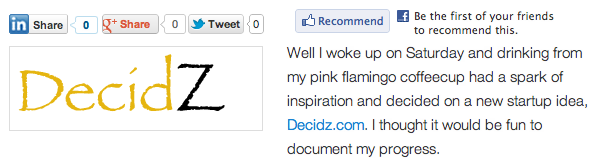
Buttons on a post page.

Settings Screen
Instalación
In your theme, use the do_action(‘professional_share’) function to render the buttons on areas other than posts and pages (e.g. homepage, category pages, etc.).
Use the shortcode [professional_share] to render buttons anywhere in a post or page. Use [professional_share show=”false”] to hide the buttons on a per-page/post basis.
- Upload the full directory into your wp-content/plugins directory
- Activate the plugin through the ‘Plugins’ menu in WordPress
- Input your Twitter username (without @) and Facebook UserId and AppID {all optional}
Preguntas frecuentes
- Where do the buttons appear?
-
Buttons can appear: top of post, bottom of post, top of page, bottom of page. Above post content for posts and below content for pages is recommended and the default.
- I upgraded from version 1.0,1.1,1.2 to 1.3+ and cannot see my buttons?
-
Go to the plugin settings page and check the boxes for button position.
Reseñas
No hay reseñas para este plugin.
Colaboradores y desarrolladores
Este software es de código abierto. Las siguientes personas han contribuido a este plugin.
Colaboradores
Traduce “Professional Share” a tu idioma.
¿Interesado en el desarrollo?
Revisa el código, echa un vistazo al repositorio SVN o suscríbete al registro de desarrollo por RSS.
Registro de cambios
1.5.1
- Bug fixes
- Fixed Facebook comment box width for some WordPress themes
- Removed extraneous Tweet word from share descriptions
- Increased priority so CSS and JS are inside html head tag
1.5
- Added widgets
- Facebook button has absolute URL to comply with July 2013 requirements
1.4
- Added new shortcode attribute to disable the buttons on a per-page basis – [professional_share show=”false”]
- Added featured image support (post thumbnail) for OpenGraph and Schema.org sharing
- Added settings quicklink on main WordPress Plugins page
- Settings page layout improvements
1.3
- Added ability to adjust position of buttons – options are top of post, bottom of post, top of page, bottom of page
- Added blog language to HTML root for SEO
- Improved CSS layout
1.2
- Replaced Google+ Share button with Google+1 button that includes share capability
- Added HTML5 compliant Google+1 code
- Improved CSS layout
1.1
- Replaced Google+1 button with new Google+ Share button
- Added schema.org and open graph meta tags for sharing
- Added shortcode [professional_share] to render buttons anywhere in a post
- Added hook to render buttons in themes – do_action(‘professional_share’)
- Added CSS class for button area(s) – ProfessionalShareBox
1.0
- First Version