

Descripción
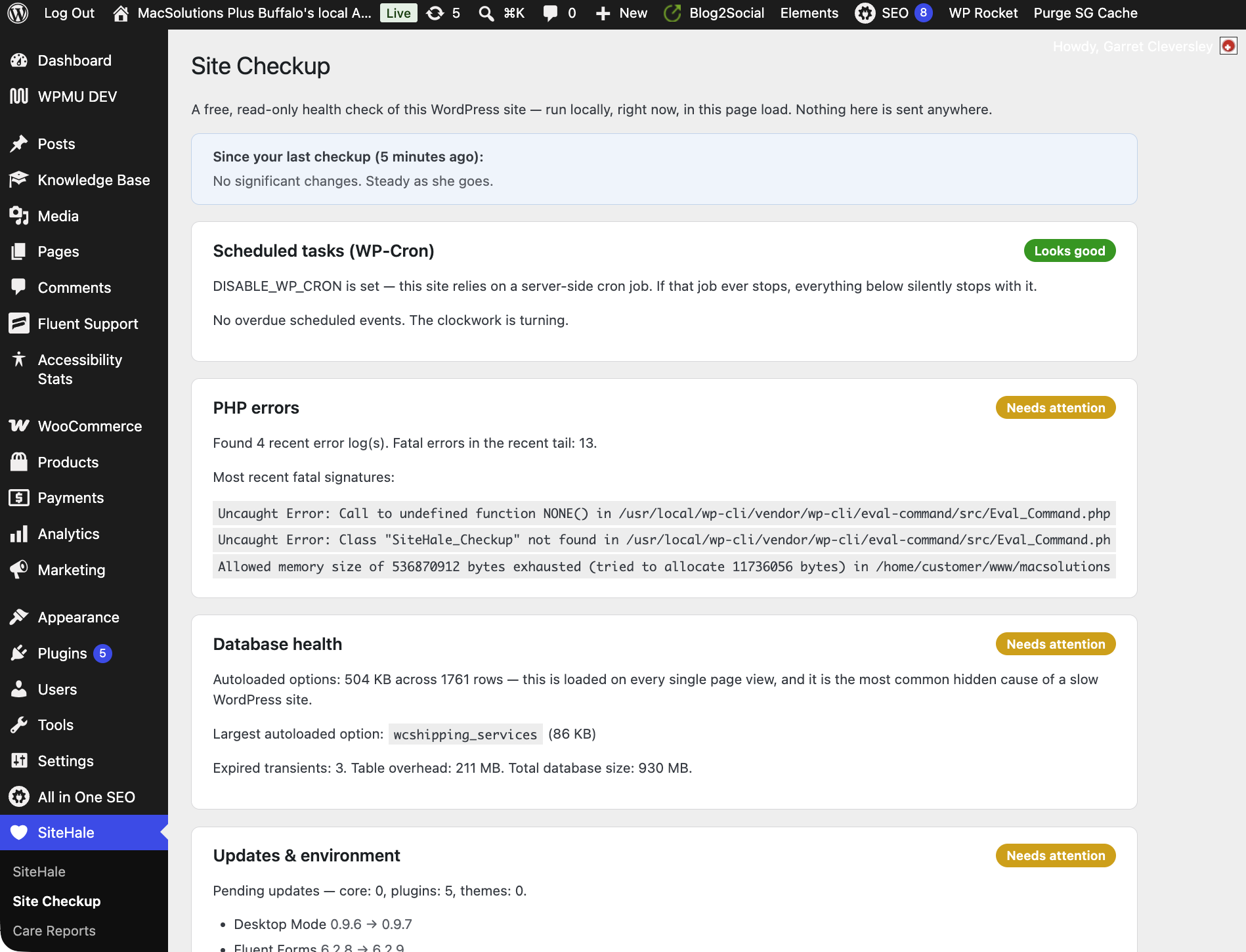
Site Checkup — free, no account needed. Install, click SiteHale Site Checkup, and get an honest, read-only health check of your WordPress site, run locally in that page load:
- Scheduled tasks — overdue WP-Cron events and Action Scheduler backlog. Dead cron silently stops scheduled posts, backups and update checks.
- PHP errors — fatal errors hiding in logs nobody reads, plus oversized logs quietly eating disk.
- Database health — autoloaded-options weight (the most common hidden cause of a slow site), expired transients, table overhead.
- Updates & environment — pending core/plugin/theme updates, and whether your PHP and MySQL/MariaDB versions are past their security-support end dates.
- SEO basics — is this site accidentally telling search engines not to index it (the classic post-migration mistake — and the weekly re-check alerts you if that switch ever flips), plain permalinks, whether anything is serving a sitemap, and whether any SEO plugin is writing your meta titles and descriptions.
- Administrator audit — every admin account listed. A new admin you didn’t create is the classic compromise sign.
- Outbound email test — one click proves whether your site can actually send mail, before a customer tells you the contact form is broken.
The checkup sends nothing anywhere — it reads your site and prints the results. It is yours, free, forever, with no account and no connection.
It tells you when it could not check. If your site’s PHP error log cannot be read — logging switched off, a custom log path, or PHP writing to the web server’s own file, which is normal on shared hosting — the checkup says exactly that, and marks the card “Could not check”. It will not show you a green tick it did not earn.
Checkup history & weekly re-check (also free, also local). Every checkup stores a compact snapshot (last 12, on your own site), so the page shows what changed since last time — “autoloaded options grew 40%”, “2 fewer fatal errors”. A weekly background re-check runs the same snapshot automatically, and if something regresses — a new administrator account, new fatal errors, cron gone overdue, an autoload jump — you get one dismissible admin notice. No regression, no notice, ever. The page also shows when the next automatic re-check is due, and warns you if it has stopped running — a plugin that promises a weekly check should be able to prove it is happening.
In Site Health too. The checkup result and the weekly re-check appear as tests under Tools Site Health, and a SiteHale panel is added to Site Health Info — the screen you copy into a support ticket when you need someone else to look. These read the last stored checkup, so they add no work to your dashboard.
An llms.txt for the AI era (free, automatic). The plugin serves a compact /llms.txt — your site’s name, tagline and an index of its published pages, posts and products — the emerging convention AI crawlers read the way search engines read a sitemap. It is built from your own published content and never goes stale. Deliberately polite: it stands down if anything else already serves that address (an SEO plugin’s version, or a real file), it is a summary rather than a full-content dump, and a site set to discourage search engines serves nothing. One filter switches it off.
Email the checkup. Send yourself (or your developer) a plain-text copy of the results via your own site’s wp_mail(). An optional, off-by-default checkbox also shares the summary with SiteHale so a human can review it and reply with recommendations — that is the only way the free half of the plugin ever sends anything anywhere, and only if you tick the box.
The other half: SiteHale managed care. The checkup runs once, when you click it. The SiteHale service (https://sitehale.com) runs checks like these — plus SEO optimization, content work, verified backups and uptime monitoring — on a schedule, every week, with a human reviewing alerts and a monthly report you can actually read. If you connect, this plugin becomes the companion:
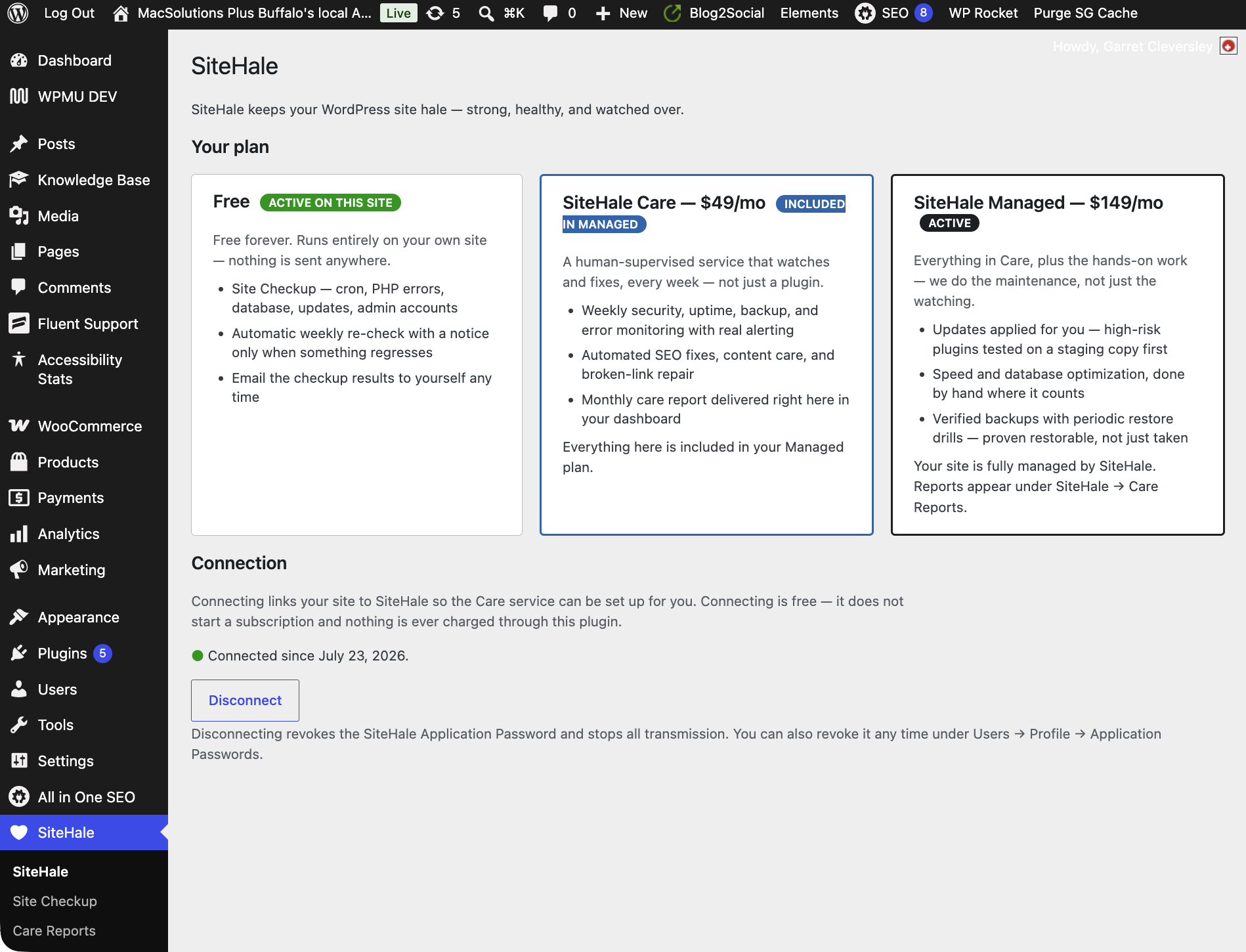
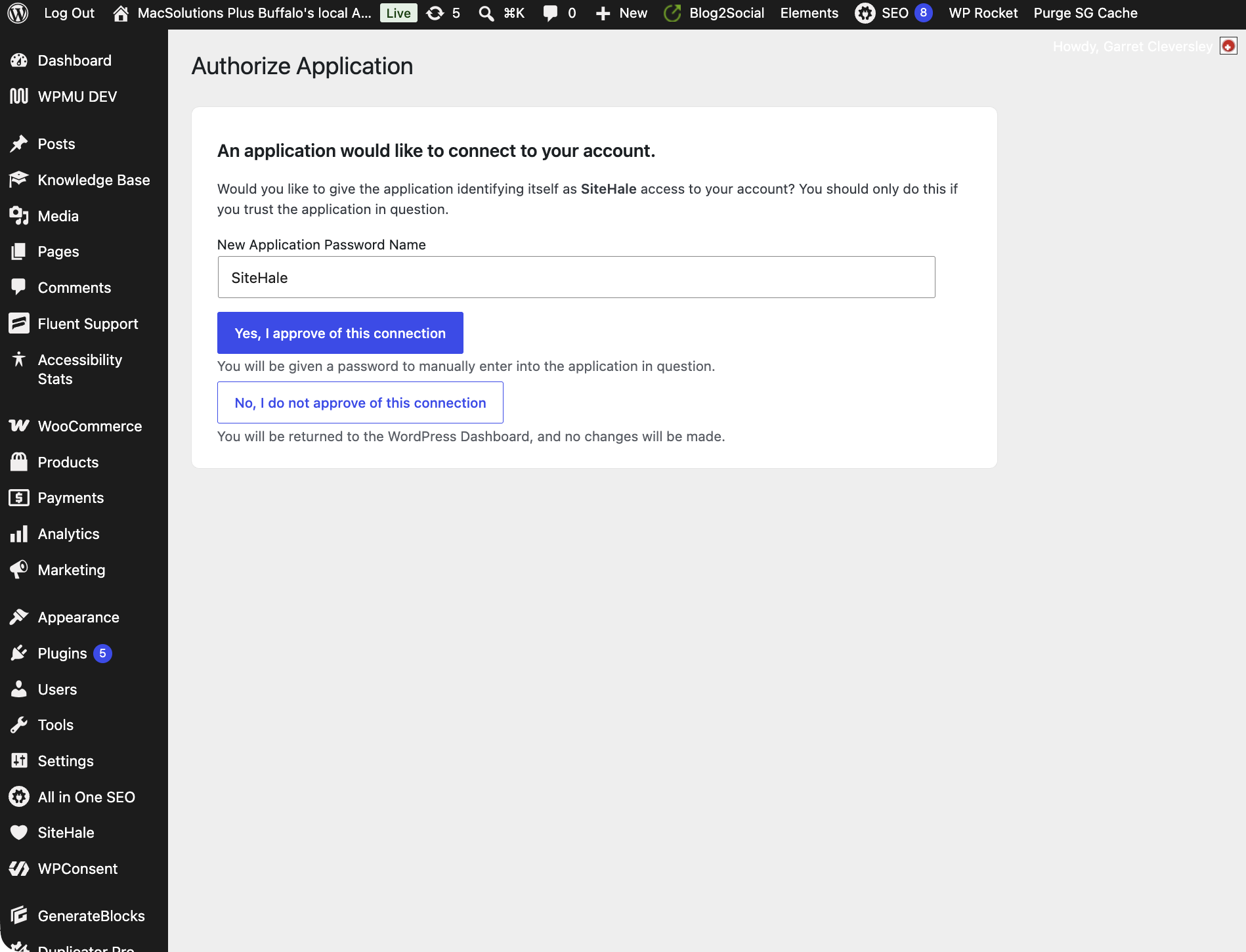
- Connect — a one-click handshake using WordPress core’s own Application Passwords authorization screen. The plugin never creates users and never mints credentials itself; you approve access on WordPress’s native consent page, under your own account, and can revoke it any time from Users Profile.
- Health diagnostics — read-only REST endpoints (the same data the Site Checkup shows) that let the SiteHale service watch over sites it cannot reach any other way. All endpoints require an Application Password plus administrator capability.
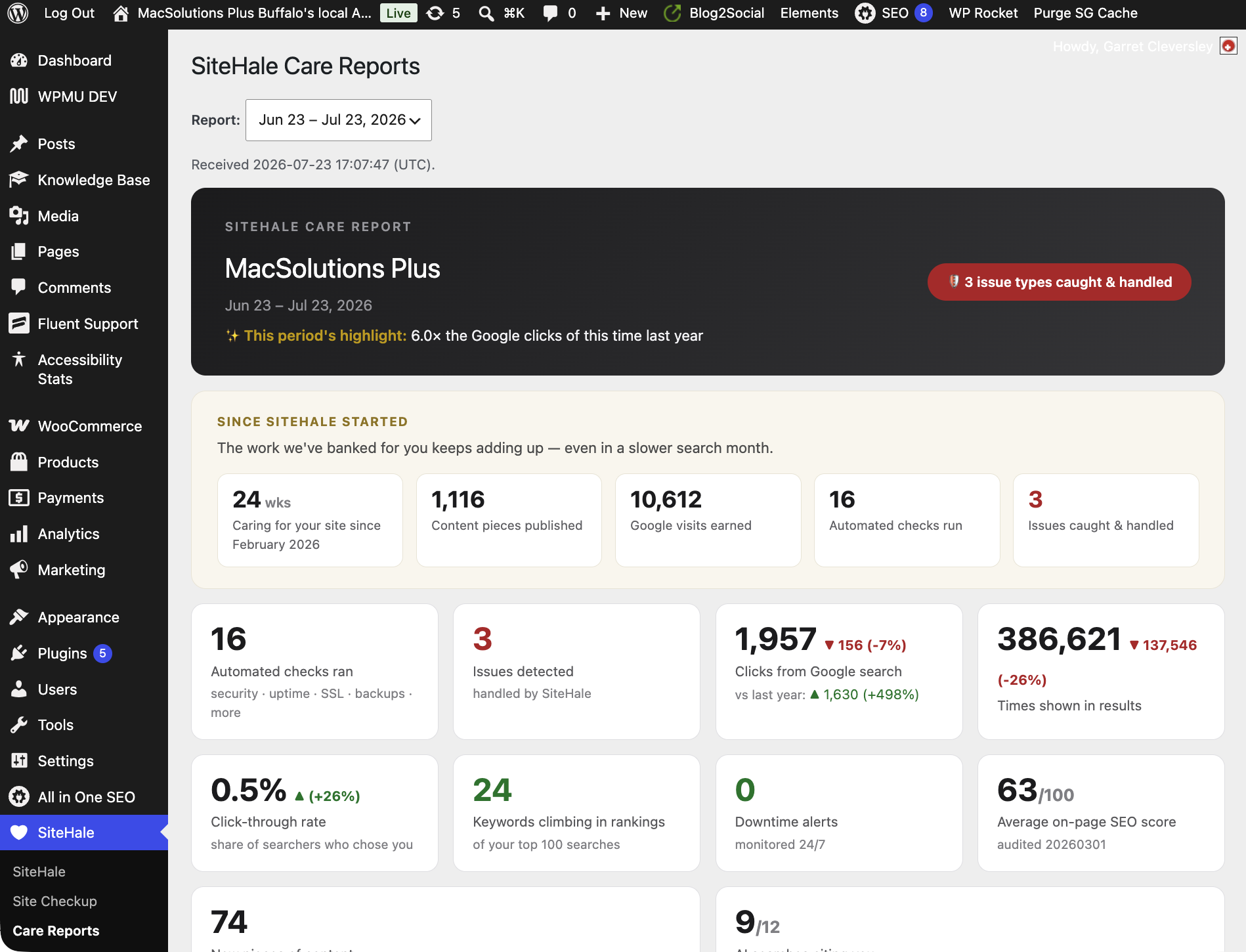
- Care reports — your monthly SiteHale care report, rendered right in your dashboard: a dashboard widget with the latest summary plus a Care Reports page with the last 12 full reports. Reports are pushed by the SiteHale service (authenticated, size-limited, HTML sanitized on arrival).
Who builds it. SiteHale is built and operated by MacSolutions Plus, an Apple Authorized Service Provider in Buffalo, NY, in business since 2001. The checks in this plugin are the same ones we run across the sites we look after every week.
External services
This plugin connects to the SiteHale managed care service (https://sitehale.com), operated by the plugin author. It makes exactly four kinds of outbound requests, each strictly after an explicit administrator action:
https://connect.sitehale.com/connect/facts— a one-time site snapshot (WordPress/PHP/database versions, theme, plugin list, permalink settings) sent when you click Connect, so the service can be configured for your site.https://connect.sitehale.com/connect/pair— the Application Password you approved on WordPress’s authorization screen, sent once to complete the connection. WordPress core returns that credential to your own site, and the plugin forwards it from your server directly to SiteHale over an encrypted connection, so it is never placed in a web address or handled by your browser.https://connect.sitehale.com/connect/checkup— sent ONLY when you tick the off-by-default “share with SiteHale” checkbox on the Email-this-checkup form: the checkup summary (the health lines shown on the page — no content, no visitor data) plus the email address you entered, so a SiteHale human can reply with recommendations.https://connect.sitehale.com/connect/regression— sent only from sites with an active paid SiteHale plan, and only when the weekly background check finds that something got worse (a new administrator account, new fatal errors, cron stopping, an autoload jump, a version reaching end of support). It sends those finding lines plus your site address, plan name and plugin version — no content, no visitor data. This is what lets the notice on your own dashboard say the problem is already with SiteHale instead of asking you to go and look at it. On the free plan, and on a connected site with no plan, this request is never made.
No other outbound requests are made. The diagnostic and report endpoints are inbound: the SiteHale service calls your site, authenticated with the Application Password you approved. Disconnecting (or revoking the Application Password under Users Profile) fully stops all access and transmission. Service information, pricing, and support live at https://sitehale.com — see How It Works (https://sitehale.com/how-it-works/), Support (https://sitehale.com/support/), Privacy Policy (https://sitehale.com/privacy/), and Terms (https://sitehale.com/terms/).
Privacy
The free half of the plugin transmits nothing at all. The Site Checkup, its history, the weekly re-check and the regression notice run entirely on your own site, and are fully usable without an account, a connection, or a subscription. (On sites with an active paid plan, and only there, the weekly check reports what regressed to SiteHale so the service can act on it — item 4 under External services.)
The plugin makes no outbound request until you explicitly ask for one — clicking Connect, or ticking the off-by-default “share with SiteHale” checkbox on the Email-this-checkup form. When you connect, a one-time snapshot of your site’s environment (WordPress/PHP/database versions, theme, plugin list, permalink settings — no content, no visitor data) is sent to SiteHale so the service can be configured for your site. Disconnecting (or revoking the Application Password) fully stops all access and transmission.
Full policy: https://sitehale.com/privacy/ · Terms: https://sitehale.com/terms/
Capturas
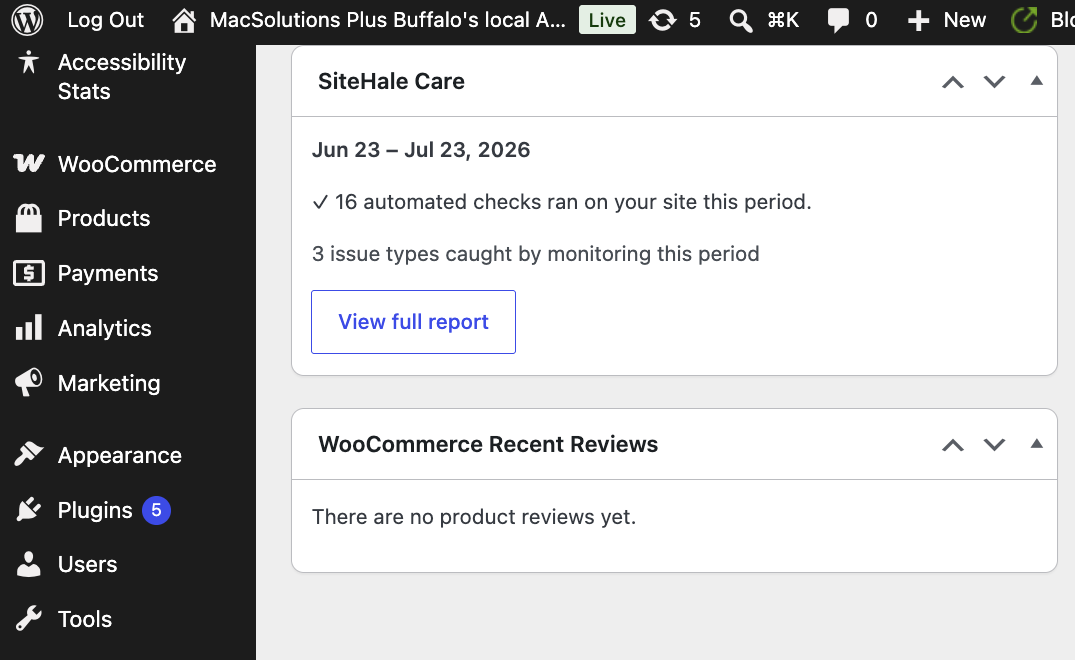
Instalación
Using the free Site Checkup — no account, no configuration, no connection:
- Install and activate the plugin.
- Go to SiteHale Site Checkup. The checkup runs on that page load and shows your results immediately.
- Optionally use Email me this checkup to send yourself a copy, and Send test email to prove outbound mail works.
That is the whole free setup. A weekly background re-check starts on its own and only speaks up if something regresses.
Optional — connecting to the paid SiteHale care service:
- Go to SiteHale and click Connect to SiteHale.
- Approve access on WordPress’s own Application Passwords authorization screen.
- Connecting is free and does not sign you up for a paid plan. Care and Managed are paid monthly plans arranged directly with SiteHale; care reports appear under SiteHale Care Reports once you have a plan and it is active. Revoke any time from SiteHale Disconnect or Users Profile.
Preguntas frecuentes
-
Does this plugin slow my site down?
-
No. It adds no scripts, styles or blocks to your pages. The only thing it does on the front end is answer requests for
/llms.txt— on every other page view its entire cost is one address comparison. The diagnostic endpoints only run when the SiteHale service calls them (authenticated), and each is a cheap, bounded read. -
What data leaves my site?
-
Nothing, unless you ask. The Site Checkup and the weekly re-check are local on the free plan. Data leaves your site in three cases, all listed under External services: when you click Connect, when you tick the off-by-default share checkbox on the Email-this-checkup form, and — on sites with an active paid plan only — when the weekly check finds something has regressed. The recipient is always SiteHale, never a third party. Disconnect stops everything.
-
Can I use this without a SiteHale subscription?
-
Yes — the Site Checkup page, its history, and the weekly background re-check are free, run entirely locally, and never expire. The Connect flow, remote diagnostics and monthly care reports are the parts that pair with the paid managed service.
-
Does clicking Connect start a subscription or charge me?
-
No — connecting by itself is free and never charges you. Care and Managed are paid monthly plans, and clicking Connect does not sign you up for one: it only pairs your site so a plan can be set up if you decide to buy one. Payment is never handled by the plugin — you arrange a plan directly with SiteHale, and it starts only once you have agreed to it. Connect without a plan and your site simply stays on Free. The SiteHale page shows your plan status (Free, Care, or Managed: not active / awaiting activation / active) at all times.
-
Does the weekly background check send anything anywhere?
-
Not on the free plan. It runs the same local snapshot the checkup page uses and stores the result on your own site. Its only visible output is a dismissible admin notice, and only when something actually regressed (a new admin account, new fatal errors, overdue cron, an autoload jump). A clean week produces nothing at all.
If you have an active paid SiteHale plan, a week that found a regression also reports those finding lines to SiteHale — that is the point of the plan, and it is why the notice on a paid site says the problem is already being handled rather than asking you to investigate it. A clean week still sends nothing.
-
Will this plugin nag me with notices?
-
No. There are two, both dismissible, and neither follows you around the admin. The first only appears when the weekly check finds a regression, and a subsequent clean check clears it automatically; on a site with an active paid plan it is quieter still, showing the finding for information without asking you to do the work, because SiteHale is already handling it.
The second asks once whether you would review the plugin on WordPress.org. It appears only on SiteHale’s own screens — never on your Posts list or your dashboard — and only after the plugin has been installed a fortnight and actually run a couple of checkups, so you are being asked about something you have used. It never appears while a regression is outstanding: if the last thing we told you is that your site got worse, that is not the moment. “No thanks” removes it permanently, and nothing is offered in exchange for a review.
-
What is llms.txt, and why is my site serving one?
-
llms.txt is an emerging convention — a plain-text index at
/llms.txtthat AI assistants and crawlers read to understand what a site is and what it publishes, much as search engines read a sitemap. The plugin serves one automatically: your site’s name, tagline, and a bounded list of published pages, posts and products, rebuilt as you publish. It transmits nothing — it is content your site serves, exactly like a sitemap. It steps aside on its own if anything else already answers that address (an SEO plugin’s llms.txt, or a real file you uploaded), and a site set to discourage search engines serves none. To switch it off:add_filter( 'sitehale_llms_txt_enabled', '__return_false' ); -
Does it work on WordPress Multisite?
-
Yes, per site. The Site Checkup, its history and the weekly re-check are per-site, so each site in a network gets its own results, and each site connects to SiteHale separately if you want it to. Network-activating the plugin makes it available everywhere; only users who can manage a site’s options see it. Uninstalling from the network removes the plugin’s data from every site in it, not just the one you were on.
-
Where do I get support?
-
Managed clients: https://sitehale.com/support/ or plugins@sitehale.com. Free-plugin questions are welcome on the WordPress.org support forum for this plugin.
Reseñas
No hay reseñas para este plugin.
Colaboradores y desarrolladores
Este software es de código abierto. Las siguientes personas han contribuido a este plugin.
Colaboradores

Traduce “SiteHale” a tu idioma.
¿Interesado en el desarrollo?
Revisa el código, echa un vistazo al repositorio SVN o suscríbete al registro de desarrollo por RSS.
Registro de cambios
0.7.51
- Housekeeping only, with no change to how the plugin behaves: tightens two internal code checks and shortens three update notices.
0.7.50
- A product rated with stars but no written review now publishes its rating too. Previously only products with a written review did, so a product whose page showed “Rated 5.00 out of 5” could publish no rating at all.
0.7.49
- Product pages now publish the brand, the star rating and customer reviews in their structured data, so shops keep their review stars in search results after switching over. Nothing is published for a product that has no reviews — an unrated product stays unrated rather than being shown as zero stars.
0.7.48
- When SiteHale manages your SEO, a “page not found” address is no longer served with your home page’s title and description. It now returns a proper not-found title, tells search engines not to index it, and no longer names itself as the preferred address for a page that does not exist.
- The one-click switch-over from your previous SEO plugin now also checks that your category and tag metadata was read, that something was actually examined, and that SiteHale has a reader for whichever plugin you are on. It stays closed rather than opening on an import that looked at nothing.
- Category and tag metadata can now be read on sites with no server access, so those sites can complete a switch-over that previously counted your taxonomy pages as empty.
- Re-importing your settings can no longer clear your business details when the address book they came from is switched off — a correction still applies, but “nothing to say” is no longer treated as “delete this”.
- On a site whose previous SEO plugin was Yoast, the share image is no longer invented from your logo when Yoast never published one.
- Leftover settings from an SEO plugin that has not run on the site for years are no longer read back in as current configuration during a re-import.
0.7.47
- Business address and hours now update fully on re-import, so a correction always takes effect.
0.7.46
- Opening hours are now published only when you have actually set them, never from the SEO plugin’s unused defaults.
0.7.45
- Fixes the sitemap disappearing after switching SEO over to SiteHale.
0.7.44
- Adds sitemap diagnostics, so a missing sitemap can be explained instead of guessed at.
0.7.43
- Sites without server access can now have their site-wide SEO settings applied, completing the no-server-access import.
0.7.42
- The option to switch your SEO over to SiteHale now appears only on sites with an active SiteHale plan.
0.7.41
- Sites without server access can now carry their site-wide SEO settings across, not just their page titles and descriptions.
0.7.39
- Keeps your sitemap working when SiteHale takes over from another SEO plugin, and carries site-wide settings across on sites without server access.
0.7.38
- Fixes an error page that could appear on “not found” pages for sites using the new site-wide snippet settings.
0.7.37
- Keeps site-wide search snippet settings when SiteHale takes over from another SEO plugin, so search results are not shortened.
0.7.36
- Fixes over-long meta descriptions on pages that had none of their own — SiteHale was using the whole page as the description instead of a short summary.
0.7.35
- Fixes sites whose SEO stayed paused after an update: SiteHale now checks several pages instead of betting on one, so a redirecting or members-only page no longer leaves the module switched off.
0.7.34
- The “Turn on SiteHale SEO” switch now waits until your existing titles and descriptions have been copied across, so switching over cannot lose them.
0.7.33
- Completes the update fix: SiteHale SEO now resumes fully after an update instead of getting halfway there.
0.7.32
- Completes the 0.7.31 fix, which did not take effect on the update that introduced it. Updating the plugin no longer pauses SiteHale SEO.
0.7.31
- Updating the plugin no longer pauses SiteHale SEO. It previously stopped managing your pages after each update until your site received a couple of visits, which on a quiet site could be hours.
0.7.30
- Switching SiteHale SEO on now takes effect straight away instead of waiting for the next few visitors to your site.
- After switching over, the SiteHale screen now confirms whether SEO is live — previously the button gave no acknowledgement at all.
0.7.29
- The SEO switch-over is now one click. If a site runs more than one SEO plugin (for example All in One SEO alongside All in One SEO Pro), all of them are switched off together instead of one per click.
- Add-ons belonging to the SEO plugin being switched off are now switched off too, which clears the “this add-on cannot be used” errors they otherwise leave behind.
0.7.28
- Fixes the SEO handover notice not appearing right after install — the moment it is most needed.
0.7.27
- SiteHale SEO now tells you when it cannot manage your SEO because another SEO plugin is active — and offers a one-click switch-over. Previously it stood down silently, so a site could sit for weeks with SiteHale SEO installed but idle.
0.7.26
- SEO module: custom robots.txt rules are now carried over and served by SiteHale. Sites that had rules configured in a previous SEO plugin kept serving them; previously those lines disappeared when that plugin was switched off, so pages meant to stay out of search results — carts, checkouts, account pages — became crawlable.
- SEO module: rules already present from WordPress or WooCommerce are not repeated, so robots.txt does not accumulate duplicate lines.
- SEO module: a site set to discourage search engines keeps WordPress’s own robots.txt untouched.
0.7.25
- SEO module: WooCommerce products now publish full product schema — price, currency, stock availability, SKU and category, with each variation of a variable product listed separately. Product pages previously published only page-level schema, so search engines could not see what was for sale or for how much.
- SEO module: a product page no longer publishes an Article entry, which described the product as a blog post.
- SEO module: WooCommerce’s own duplicate product markup is now stood down on pages where SiteHale publishes product schema, so the page describes each product once instead of twice.
0.7.24
- SEO module: canonical and og:url now use the same address scheme (http or https) the page was requested on, instead of whatever is saved in your WordPress address setting.
0.7.23
- SEO module: fixes the module refusing to manage SEO on sites using a block theme (Twenty Twenty-Four, Twenty Twenty-Five and similar), where it wrongly detected the theme’s own title tag as another SEO plugin.
0.7.22
- SEO module: a separate blog page now uses the title and description you set on it, instead of falling back to your site title.
0.7.21
- SEO module: social share images now publish their dimensions, so Facebook and LinkedIn lay the card out correctly instead of cropping or falling back to a thumbnail.
0.7.20
- SEO module: your default social share image and Twitter card style are carried over from your previous SEO plugin, so pages without their own image still share with a picture.
0.7.19
- SEO module: site-wide robots rules carried over from your previous SEO plugin are now honoured — page 2 and beyond of an archive, feeds, and search results stay out of the search index when you had them set that way.
0.7.18
- SEO module: your WooCommerce shop page now uses the title and description you set on it, instead of falling back to the generic page template.
0.7.17
- SEO module: your organization logo now publishes its real width and height in structured data, instead of leaving them out.
0.7.16
- SEO module: fixes FAQ and other custom structured data being stored corrupted when it contained a quoted phrase, which left those items publishing no structured data at all.
0.7.15
- SEO module: page 2 and beyond of a category or archive keeps the separator in its title — “Site Name – Page 2” rather than “Site Name Page 2”.
- SEO module: page 2 and beyond of a static front page now gets its own title and a working canonical link, instead of repeating the home page’s title and pointing at a URL that did not exist.
0.7.14
- SEO module: posts with no featured image now use an image from the post’s own content in their structured data, as your previous SEO plugin did — previously those posts published no article image at all. Images inserted by WordPress are found by their attachment, so older posts and sites that have moved or renamed their uploads folder still work.
0.7.11
- SEO module: article images now publish their real width, height and caption in structured data, as your previous SEO plugin did — search engines read those dimensions when deciding how to show your images.
- SEO module: articles now publish the category they belong to, the page language, and the article name alongside its headline.
0.7.10
- SEO module: your organization’s description, email, phone and founding date are now carried across from your previous SEO plugin and published in your Organization structured data, instead of only its name.
0.7.9
- SEO module: search-engine ownership tokens (Google, Bing, Yandex, Baidu, Pinterest, Norton) are now carried across from your previous SEO plugin and kept on the page, so switching does not un-verify your Search Console property.
0.7.8
- Fixes a fatal error in 0.7.7 that could take a site’s pages offline when SiteHale was managing its SEO. 0.7.7 was never released beyond one test site.
0.7.7
- SEO module: your site’s social profile links and organization details are now carried across from your previous SEO plugin, and used for
article:publisher,twitter:siteand thesameAslinks on your Organization data. - Author avatars appear in article structured data again, where the site shows avatars.
- The organization logo configured in your previous SEO plugin is preferred over the theme logo, because it is the one that was actually being published.
0.7.6
- SEO module: a sitemap URL whose provider is not registered now redirects to the sitemap index instead of quietly serving the home page at HTTP 200. WordPress core returns without setting a 404 in that case, so removing any provider leaves a soft 404 behind.
0.7.5
- SEO module: WordPress core’s sitemap now excludes items carrying a SiteHale
noindex. Core has no noindex concept, so a cutover previously moved those items straight from “excluded” to “submitted while noindex”. - The author sitemap is suppressed only where exactly one author has published — on a single-author site the archive duplicates the blog index. Multi-author sites keep theirs.
sitehale_seo_author_sitemapoverrides. - Retired sitemap addresses (
sitemap_index.xml,sitemap.rss,sitemap.html, …) 301 to/wp-sitemap.xmlinstead of 404ing — and only when the request was already going to 404, so nothing that still serves is shadowed. - All of it is inert unless SiteHale is the renderer on that request.
0.7.4
- SEO module: BreadcrumbList/ListItem schema is now built from the site’s own hierarchy by default (post and page ancestors, term ancestors, the post type archive). It previously required the
sitehale_seo_breadcrumbsfilter to supply a trail, so no site rendered one. The filter still overrides. - The trail never links its own last item, which is the most common reason a valid-looking BreadcrumbList is rejected.
0.7.3
- New, for sites on a SiteHale plan: SiteHale can now manage your site’s SEO metadata itself — title, meta description, canonical, robots, OpenGraph and Twitter tags, and structured data — as part of the managed service, replacing the SEO plugin rather than sitting beside it. Free installs are unchanged. The free checkup still only reports on your SEO — whether the site is accidentally set to discourage search engines, and which plugin is writing your meta titles — it does not write it. Writing it is what the service does.
- Whatever the plan, SiteHale will not double up on anything. Before rendering, it reads your site’s actual
<head>on real page views and stands down if it finds a title, canonical, description, robots directive, OpenGraph or Twitter tag that something else already emits. That is a measurement, not a list of plugin names: it catches a theme or a social plugin nobody would think to name, and it does not stand down for an SEO plugin that is installed but rendering nothing. Two different kinds of page have to be seen — one an individual post or page — before it renders; a single foreign tag anywhere stops it; and installing another SEO plugin takes effect on the very next page load. - WordPress’s own canonical is left in place unless SiteHale is actually replacing it. Core’s robots directives are added to rather than replaced, so
max-image-preview:largesurvives; anoindexset by WordPress or another plugin is never turned back intoindex; and a site set to discourage search engines stays that way whatever is stored. - Filters:
sitehale_seo_enabledswitches the module off entirely,sitehale_seo_renderthe rendering alone.
0.6.1
- Fix: the PHP-errors card now dates each fatal line and counts only those from the last 7 days. Error logs are picked up by file modification time, so one recent entry could keep a whole month of already-fixed history in the count — a resolved July incident was still raising the alarm in mid-August. Older fatals are reported as history (“N older fatals … not counted above”), and a fatal line with no readable date still counts, so the card fails toward reporting, never silence.
0.6.0
- New: SEO basics card on the Site Checkup — whether search engines are allowed to index this site, permalink structure, which SEO plugin (if any) is writing your meta titles and descriptions, whether a sitemap is being served and by what, theme title-tag support, and a default-tagline reminder. Read entirely on your own site, like every other card.
- New: the weekly re-check now treats “Discourage search engines” being switched on as a regression and tells you about it. It is the classic post-migration mistake, it is silent, and it drains search traffic for as long as nobody notices — which is exactly what the weekly check exists to prevent.
- New: your site serves an automatic
/llms.txt— a compact index (name, tagline, published pages, posts and products) that AI assistants read the way search engines read a sitemap. Built from your own published content, so it never goes stale. It stands down by itself if an SEO plugin or a real file already serves that address, serves nothing on a site set to discourage search engines, and can be switched off with one filter (see the FAQ). - New: a disk-space diagnostic endpoint for the SiteHale service (free space, and a bounded measure of the uploads folder), so sites the service reaches only through this plugin get the “disk is filling up” warning the SSH-managed ones already had. Inbound and authenticated like every other diagnostic; the free plugin sends nothing.
0.5.3
- Fixed: the Multisite uninstall loop used unprefixed variables. uninstall.php has no function scope, so those were globals that could collide with something else loaded at uninstall time — and the symptom would have been silent, with cleanup skipping sites on a network nobody is watching. No change to behaviour on a single site.
0.5.2
- New: a one-time review request on SiteHale’s own admin screens, after the plugin has been installed a fortnight and run at least two checkups. It is never shown site-wide, never shown while a regression is outstanding, and “No thanks” removes it for good. No incentive is offered for a review.
- Changed: on sites with an active paid SiteHale plan, the weekly regression notice is now informational instead of a task list. Every finding it can raise — a new administrator, new fatal errors, cron stopping, an autoload jump, an out-of-support PHP or database version — is already checked centrally on those sites, so the notice was handing a paying customer work they pay SiteHale to do. It now states what changed, says the plan covers it, and drops the “Run a full Site Checkup” button. On the free plan, where you are the one watching the site, the notice is unchanged.
- New: on those same sites, the weekly check reports what regressed to SiteHale (External services, item 4), so a new fatal error reaches the people responsible for it instead of waiting for the next scheduled look. The notice only claims SiteHale has been told when that report actually got through; if it could not, it says the site’s regular checks cover it, which is true either way. The free plan transmits nothing from the weekly check, as before.
- Changed: an unexplained new administrator account still asks you directly, on every plan — nobody but you can say whether you created it. On a paid site it now points you at SiteHale rather than telling you to investigate alone.
0.5.1
- Compatibility: tested against WordPress 7.1 on a clean install. Nothing in this plugin touches what 7.1 changed — it adds no scripts or styles, registers no blocks and uses no jQuery — so the iframed post editor, client-side media processing, component and toolbar changes, the new SVG icon API and the jQuery UI update all pass it by.
- Changed: now requires WordPress 5.7 or later, up from 5.6. The plugin records when the SiteHale service last contacted your site, and identifies a genuine service call using a function WordPress added in 5.7. On 5.6 that check could not run, so opening a diagnostics address in your own browser was recorded as contact from SiteHale — a reassurance the plugin had not earned. WordPress 5.6 was released in December 2020.
0.5.0
- New: Site Health integration — the Site Checkup result and the weekly re-check now appear as tests under Tools Site Health, and a SiteHale panel is added to Site Health Info. Both read the checkup already stored on your site, so nothing extra runs on your dashboard.
- New: the Site Checkup page shows when the next automatic weekly re-check is due, and says so plainly when it is not scheduled or has stopped running because this site’s WP-Cron is not firing. The plugin promised a weekly check; now it verifies one is actually going to happen.
- New: when your site is connected, the SiteHale page and dashboard widget show when the service last contacted it — proof you can see, rather than a promise you have to take on trust.
- Fixed: the PHP errors card could report “no logs found”, which reads as a clean bill of health, on sites where no log could be read at all — error logging switched off, a custom WP_DEBUG_LOG path, or PHP writing to the web server’s own log (the normal arrangement on much of shared hosting). It now names which of those it found and marks the card “Could not check”. A custom WP_DEBUG_LOG path is also read properly now, instead of being missed.
- Fixed: uninstalling left one stored setting behind, and on a Multisite network cleaned up only the site it was run from. Uninstall now removes everything the plugin stored, on every site in the network.
- Fixed: fatal errors caused by your own WP-CLI
wp evalcommands were counted as faults on the site. They share the same error log, so a typo at the command line was reported back as a production fatal — and would have triggered the weekly regression notice. They are now listed separately and excluded from the count. A genuine error that happens to occur while WP-CLI runs a scheduled task still counts, because your site would hit it on a page load too. - Compatibility: tested against WordPress 7.0.3. WordPress 7.0 raised its own minimum PHP version to 7.4, which this plugin has always required.
- Fixed: the diagnostics could emit PHP notices of their own when a check came back empty — unhelpful in a plugin whose job is reporting PHP notices. Also, the Action Scheduler table lookup now escapes the table prefix so it cannot match a similarly named table.
0.4.11
- Hardened: the SiteHale page no longer updates the stored connection timestamp from a page address. The connection is recorded only by the server-to-server handshake that actually completes it, so a crafted link can never make a site appear connected.
- Clarified the readme: the Site Checkup, its history and the weekly re-check are free and fully usable on their own; the Privacy section no longer implied a subscription is required. Installation now documents the free setup first.
0.4.10
- Internal code-quality annotation only. No functional change.
0.4.9
- Removed an unused connection setting left over from the previous release. No change to behaviour; the plugin now contacts only the three addresses listed under External services.
0.4.8
- Security: the Application Password created when you click Connect is no longer passed through a redirect to an external address. WordPress now returns it to your own site, and the plugin sends it to SiteHale directly over an encrypted server-to-server request. Nothing about what is shared changes; it simply never travels in a web address.
- Connect failures are now reported instead of failing quietly, so you are never left with an unused Application Password and no explanation.
0.4.7
- Housekeeping: stored care reports are now reconciled when a new report arrives, so a report body can no longer linger in the database after its entry has gone. No change to what is shown or reported.
0.4.6
- Connect: the confirmation URL shown on the WordPress authorization screen is now much shorter and easier to read. No change to how the connection works or what is sent.
0.4.5
- Hardened: the database-health and Action Scheduler diagnostic queries now bind every value through $wpdb->prepare() with explicit placeholders instead of interpolating them. No change to the data reported.
0.4.4
- Fixed: sites set up by the SiteHale service directly (without the browser Connect flow) showed “Not connected” even while receiving care reports. Receiving an authenticated care report now marks the site as connected, so the Connection section always matches the plan status.
0.4.3
- New: “Your plan” panel now shows the SiteHale Managed plan ($149/mo) — everything in Care plus updates applied for you (staging-tested first), speed and database optimization, and verified backups with restore drills. The badge lights up when your site is on the Managed plan.
- Improved: care report delivery now records which plan the site is on, keeping the plan panel accurate automatically.
0.4.2
- Improved: the Care Reports page lets modern dashboard-style care reports use the full admin width; legacy email-style reports in the history keep the original boxed rendering.
0.4.1
- New: “Your plan” panel on the SiteHale page — a side-by-side breakdown of the Free plan (the full plugin: Site Checkup, weekly re-check, regression notices — free forever) versus the paid SiteHale Care service ($49/mo), with a live status badge: Not active, Awaiting activation (connected but Care not yet started), or Active (a care report has been delivered).
- Clarified: connecting links your site so Care can be set up — it is free, does not start a subscription, and nothing is ever charged through the plugin. The connected state now says so instead of implying the service is running.
0.4.0
- New: Checkup history — every Site Checkup stores a compact local snapshot (last 12) and the page shows what changed since last time, in both directions.
- New: Weekly background re-check (WP-Cron, local only) with a single dismissible admin notice shown only when something regressed: new administrator account, new fatal errors, cron gone overdue, autoload-weight jump, or an environment component reaching end of security support. A clean check clears the notice.
- New: Email this checkup — send the summary to any address via your own site’s wp_mail(). Optional off-by-default checkbox shares the summary with SiteHale for a human follow-up (disclosed under External services).
- Uninstall now also removes the checkup history, regression state, and the scheduled event.
- Fix: database-health diagnostics on MySQL 8 hosts emitted PHP 8 “Undefined array key” warnings (information_schema returns UPPERCASE column names on MySQL, lowercase on MariaDB) — every column is now explicitly aliased.
0.3.0
- New: Site Checkup — a free wp-admin page that runs the plugin’s health diagnostics locally (cron health, PHP error logs, database health, pending updates plus PHP/database end-of-support grading, administrator audit, outbound mail test). No account, no network calls, read-only.
0.2.1
- Connect intake moved to the connect.sitehale.com subdomain (marketing site now lives at sitehale.com). No change to already-connected sites.
0.2.0
- Care reports: authenticated report-push endpoint, SiteHale Care Reports admin page (last 12 reports), and a dashboard widget showing the latest care summary.
0.1.0
- Initial release: Connect flow (core Application Passwords authorization), connect-code fallback, diagnostic REST endpoints (cron, PHP errors, DB health, updates, admins, mail probe).