
Descripción
PubExa is an ad manager and an ad network in one plugin. Build and place your own ads with no account at all — or connect to the PubExa network and get paid for the space you already have. Most WordPress ad plugins only manage code you bring yourself. PubExa can also be the one paying you, which makes it a genuine AdSense alternative rather than another way to insert someone else’s tags.
Demo (open it on a phone to see the scroll-in ad tabs) · Plugin home · Support forum · Watch the 16-second demo
See it working in about a minute
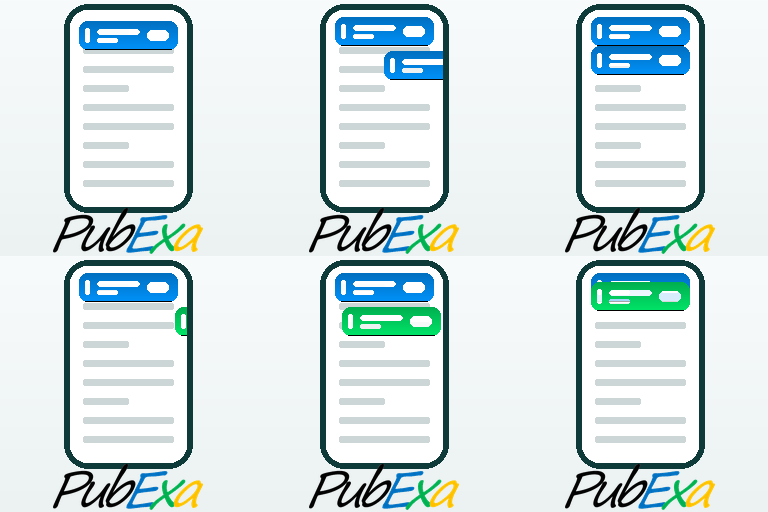
Activate the plugin, then open your own site on a phone. You will see the ad tabs sliding in as you scroll — three demo ads, running in Preview Mode, so you can judge the format, the animation and the colours before you create a single ad or open any account. Nothing is served to your readers until you say so.
Your own ads, no account required
Open My Ads and create as many as you like. There are two kinds, and they are different on purpose:
- Tab banners — the mobile format. Either a text ad (a headline up to 30 characters, a description up to 160, and your link) or a single 320×100 image, or 640×200 for a sharper result on modern phones.
- Cards — a picture with a separate title and description, shown in rows inside your content and in sidebars.
Drag them up and down to change the order they appear in, set any of them active or paused, and preview each one before it goes live.
These are your ads, so they can be anything you want promoted: your own best article, a product you sell, an affiliate offer including Amazon links, another site of yours, or a friend’s site. An ad manager and a monetization tool in the same screen.
Choose what runs on your site
The tabs and the cards are separate units with separate settings, so a decision about one never quietly changes the other. Each has its own source:
- Mine only — nothing but the ads you created yourself. No account needed.
- Network only — ads from the PubExa network, which you are paid for.
- Mixed — alternating: one of yours, then one from the network, then yours again.
- Off — that unit does not appear anywhere, automatically or by shortcode.
- The tabs additionally offer Preview Mode — demo ads, for judging the look before anything real runs.
Each unit also has its own list of where not to appear: the home page, posts, pages, archives, or any list of addresses. And any single post or page can opt out of either unit from the editor sidebar.
Mobile-first ad tabs
The signature format is a slim ad “tab” that slides in as the reader scrolls, shows a single clean ad, and can be dismissed with one tap. It never takes over the page and it never blocks what your reader is about to read.
You control how it behaves:
- how far down the screen it sits
- how much space there is between one ad and the next
- the background colour of text ads
- the animation: none, slide down from the top, slide in from the left or the right, diagonally in from either top corner, or rising up from below on either side
- and, if you want a more aggressive setup, a second set of ads at the bottom of the screen as well
Cards inside your content
Cards are rows of picture-and-text units that sit inside an article. You can let the plugin place them for you, paste them exactly where you want, or both at once.
Automatic placement offers four positions, each with its own number of cards: before the article, after the second paragraph, at the end of the article (directly under your last paragraph, above the comments), and before the footer (at the very bottom of the page, below everything). A practical pattern for an established site: let automatic placement handle your older posts, so you never have to reopen and redesign them, and use the shortcode on new pages where you want exact control.
Wherever a row appears, you choose how many cards it shows — up to 12 — and it sizes itself to the width of your content or your page.
Where ads can appear
- Scroll-in ad tabs at the top of the screen, and optionally a second set at the bottom
- Rows of cards inside your content, at up to four positions
- A column of cards in a sidebar
- A single card anywhere you want one
- A leaderboard banner, 970×90, on desktop screens
- Anywhere you like, using a shortcode — including sidebars and widget areas
- Anywhere you like, using an Elementor widget
Shortcodes
Paste these anywhere, including sidebars, widgets and page builders:
[pubexa_row]— a row of cards[pubexa_column]— the same cards stacked vertically, for a sidebar[pubexa_ad]— a single card[pubexa_leader]— a leaderboard banner, 970×90, hidden on narrow screens
A shortcode you paste yourself is never overridden by a setting: pasting one is how you decide a unit belongs there. Each accepts options, so you can set the width, the card shadow and how many cards to show without writing any CSS.
Elementor
Three native Elementor widgets — Ad, Column and Leaderboard — drag straight onto the canvas. Card shadow and corner radius are controlled from Elementor’s own Style tab, so ads match the rest of your design instead of fighting it.
See what your ads are doing
The Reports screen shows impressions, clicks, CTR and dismisses for every one of your own ads, month by month. You can see which of your ads people actually respond to, and which one is quietly wasting the space.
Run more than one site?
The Transfer screen exports everything you configured on one site — settings and your own ads together — to a single file. Import it on the next site and you are done. Nothing has to be set up twice.
Optional: earn with the PubExa network
When you are ready to monetize, create a free publisher account, add your Site ID under General, and set the tabs or the cards to Network or Mixed. Network ads use the placements you already set up — the tabs, the card rows, the leaderboard — matched to the topic of each page, and you earn a revenue share on every click.
You stay in control of what runs on your site: block ads by keyword, by topic, or by whole verticals such as gambling, alcohol or politics, and they will never be served to your readers.
Privacy and consent
PubExa includes a built-in cookie mode, so you decide whether ads run before, after, or regardless of a visitor’s consent, and you can point it at your own privacy policy. If you ever uninstall, the plugin can remove every trace of itself from your database.
Why the ad tab exists
Mobile is where most of your readers are, and mobile is where advertising works worst. A phone screen has almost no room to spare: a banner at the top gets scrolled past in half a second, a banner inside the text interrupts the reading, and anything larger covers what someone came to read. So publishers add more units, readers get more irritated, and the ads perform worse — which leads to still more units. That spiral is why so many mobile sites are unpleasant to use, and why so many readers install an ad blocker.
The ad tab is a different answer to the same problem. It uses the space beside the content instead of the space inside it, appears only after the reader has already read something, moves in a way the eye notices, and disappears with one tap if it is unwanted. An ad that respects the reader gets looked at, and an ad that gets looked at is worth more to the advertiser and to you.
That is the whole idea: better use of the little space a phone has, rather than more of it.
External services
This plugin connects to the PubExa ad network, an external service operated by PubExa LLC, in order to request ads and record ad events. This connection is required for the plugin’s core function of serving network advertising.
What is sent, and when:
- When a page that contains a PubExa ad unit is viewed, the plugin sends an ad request to the PubExa ad server. The request includes: the page URL, page title, page language, the visible page headings (H1–H6), an anonymous first-party visitor identifier (stored in the
pubexa_vidcookie), your site host, and the visitor’s IP address (used for fraud prevention and coarse country reporting). - When an ad is shown, clicked, or dismissed, the plugin sends an event (impression, click, or dismiss) with the associated delivery identifier so the event can be recorded.
- If you choose “Remove and delete data” when deactivating, and optionally give a reason, the plugin sends a one-time anonymous feedback message to PubExa (
https://pubexa.com/api/plugin-feedback). It includes only: the reason you typed, the plugin/WordPress/PHP versions, whether the site is multisite, and a random anonymous install identifier. No personal data, site URL, or account data is sent. This is optional telemetry and never blocks deactivation.
The ad server endpoint is the URL you configure in the plugin settings (the PubExa ad server). Use of the PubExa service is governed by the PubExa Advertiser and Publisher Terms of Service and Privacy Policy:
- Publisher Terms of Service: https://info.pubexa.com/publisher-terms-of-service/
- Advertiser Terms of Service: https://info.pubexa.com/advertiser-terms-of-service/
- Privacy Policy: https://info.pubexa.com/privacy-policy/
- Cookie Notice: https://info.pubexa.com/cookie-notice/
Capturas


Instalación
Getting started
- In your WordPress dashboard go to Plugins Add New, search for PubExa, and click Install, then Activate. (Or upload the plugin folder to
/wp-content/plugins/and activate it from the Plugins screen.) - A PubExa menu appears in the dashboard sidebar.
- Open your own site on a phone. Ads are already running in Preview Mode, so you can see the format immediately — nothing real is shown to your readers yet.
- Go to PubExa My Ads and create your first ad.
- Go to PubExa Tabs and set the source to Local only to start showing it.
No account and no ad code are needed for any of that. If you later want to earn from the PubExa network, add your Site ID under General and set the source to Remote only or Mixed.
The six screens
The PubExa menu has six screens: General, Tabs, Cards, My Ads, Reports and Transfer. The first three hold settings, My Ads holds the ads you create, and the last two are reporting and moving between sites. Each is described below with every option and what changing it actually does.
General
Connection and consent.
- Site ID — the identifier of your site on the PubExa network. Leave it empty and the plugin still works with your own ads; fill it in and network ads become available.
- Cookie banner — off, or shown before ads run, or shown alongside them. This decides whether a visitor sees a consent notice and whether ads wait for it.
- Banner text — the wording of that notice.
- Privacy policy link and Cookie notice link — where the notice points. Both default to the PubExa documents and can be changed to your own.
Tabs
The mobile scroll-in format, and nothing else. Nothing on this screen affects the cards.
- Source — Remote only, Local only, Mixed, Preview Mode, or Off. Off is how you switch the tabs off; there is no separate switch.
- Where to show — not on the home page, not on posts, not on pages, not on archives, plus a list of addresses to skip. These rules apply to the tabs only.
- Header height offset — pushes the tab below a fixed header. Leave it at 0 if your theme has none.
- Scroll distance between tabs — how far the reader scrolls before the next ad arrives. Larger is calmer.
- Background opacity — how solid the tab looks over the page behind it.
- Tab colours — five pastel shades that cycle through your text ads.
- Animation, top of screen and Animation, bottom of screen — how each tab enters. Setting either to None turns off that set of tabs.
Cards
Every card unit on the site: the automatic rows, the sidebar column, the single card, and the shortcodes.
- Source — Mixed, Network only, My ads only, or Off. Off means no cards anywhere: not automatic, not by shortcode.
- Place cards automatically — turns automatic placement on or off. It has no effect on shortcodes or Elementor widgets, which always work.
- Positions — before the article, after the second paragraph, at the end of the article, and before the footer. Each has its own number of cards, up to 12.
- If the page already contains a card shortcode, skip the automatic ones — prevents doubling up on pages where you placed cards by hand.
- Maximum width — in pixels, or 0 to fill whatever container the row sits in.
- Card shadow — none, soft, medium or strong.
- Where to show — the same four page-type rules and address list as the Tabs screen, but for the cards.
- Shortcodes — the four shortcodes with a copy button and a line explaining each.
My Ads
The ads you create yourself, in two sections.
- Tab banners — the mobile format: a text ad, or a single 320×100 image with the text already part of the picture. A live preview shows how the text will break on a phone.
- Cards — a picture with a separate title and description.
Both sections let you drag ads into the order you want, pause and resume them, edit or delete them, and act on several at once. Impressions and clicks appear next to each ad.
Reports
Impressions, clicks, CTR and dismisses for every one of your own ads, month by month, with a monthly total at the top. Network earnings are reported in your publisher account, not here.
Transfer
Writes one file holding your settings and your own ads. Import it on another site and that site ends up configured the same way. The two sites never have to reach each other, and the images of image ads can travel inside the file. On import you choose whether to keep the ads already on the target site or replace them.
Per-page opt-outs
Any post or page can hide the tabs, the cards, or both, from a small PubExa box in the editor sidebar. If you use Elementor, the same two switches also appear in Elementor’s Page Settings.
Preguntas frecuentes
-
Do I need an account?
-
To serve network ads you need a free PubExa publisher account and a Site ID. You can use Local ads and Preview mode without network serving, but a Site ID is required for network ads and earnings.
-
Does the plugin slow down my pages?
-
Ad requests run in the browser after the page is shown, so reading the page headings and requesting ads does not block page loading.
-
What data does the plugin send to the PubExa server?
-
See the “External services” section above for the full list. In short: page context (URL, title, language, headings), an anonymous visitor identifier, your site host, and the visitor IP for fraud prevention and country reporting.
-
Where can I read the terms and privacy policy?
-
Publisher Terms: https://info.pubexa.com/publisher-terms-of-service/ — Privacy Policy: https://info.pubexa.com/privacy-policy/
Reseñas
No hay reseñas para este plugin.
Colaboradores y desarrolladores
Este software es de código abierto. Las siguientes personas han contribuido a este plugin.
Colaboradores
Traduce “PubExa – Ad Manager, Ad Inserter & Website Monetization” a tu idioma.
¿Interesado en el desarrollo?
Revisa el código, echa un vistazo al repositorio SVN o suscríbete al registro de desarrollo por RSS.
Registro de cambios
1.7.0
- The dashboard is reorganised around what each ad unit is, not which device it appears on. Six screens instead of eight: General, Tabs, Cards, My Ads, Reports and Transfer.
- The tabs and the cards are now fully independent. Previously the ad source on the mobile screen also silenced the desktop card rows without saying so.
- Every unit has one place that switches it off, and its own list of pages and addresses to skip.
- Shortcodes and Elementor widgets are no longer affected by any placement setting. Pasting one is how you decide a unit belongs there.
- The card row before the footer became the fourth automatic position, alongside before the article, after the second paragraph and at the end of the article. Each position has its own number of cards.
- The two per-page opt-out switches now appear in the standard editor sidebar, not only in Elementor.
- Your existing settings are converted automatically on update. Nothing that was hidden before becomes visible.
- Removed a tab height setting that had no effect: the tab is a fixed 100 pixels, matching the banner format.
- Corrected a description that said mixed mode showed your own ads first — it alternates, one of yours then one from the network.
- Export and import now understand files written by earlier versions.
1.6.6
- Listing only — nothing in the plugin changed, and there is nothing for you to do.
- Added an animated screenshot showing the ad tab sliding in as you scroll, and moved the demo video to the top of this page.
1.6.5
- Listing only — nothing in the plugin changed, and there is nothing for you to do.
- The plugin now has a proper description of what it actually does, documentation of every screen and every setting, screenshots of the plugin in use, and a short video of the ad format running on a real site.
1.6.4
- Listing only: the plugin’s name in the WordPress.org directory now describes what it does, so people searching for an ad manager, an ad inserter or a way to monetize a site can actually find it. Nothing in the plugin changed — no settings, no behaviour, no action needed.
1.6.3
- Housekeeping: removed an unused internal setting that was never read by anything. Desktop ads have always been switched on and off by the placement choice under Desktop ads — that has not changed and needs no action from you.
- Fixed a code comment that described the wrong setting as the desktop master switch.
1.6.2
- New Transfer page. Export a site’s PubExa settings and Local Ads to a single file, then import that file on another site to reproduce the same setup — useful if you run more than one site and don’t want to configure each one from scratch.
- The export can carry the images of your image ads inside the file, so the new site does not depend on the old one. You can turn that off for a much smaller file.
- On import you choose whether to bring settings, local ads, or both, and whether the imported ads are added to the existing ones or replace them.
- Your Site ID is never exported, so each site keeps its own connection and its earnings always stay with the right site.
- Uninstall now also removes the newer settings that earlier versions left behind when “delete all data” was selected.
1.6.1
- Fixed two output-escaping warnings raised by Plugin Check, in the copy buttons on the shortcode reference blocks.
1.6.0
- The card row now fills the container it is placed in by default, instead of being capped at a fixed width. This makes it behave as expected inside page-builder sections, footers and sidebars.
- Every settings page that affects a placement now lists the shortcodes for it, with a copy button, and the General page lists them all in one place.
- The Elementor widgets now fill the container they are placed in. Their own size control still caps them when you want a fixed width.
- New card shadow. In Elementor the widgets gained a Style tab with a full box-shadow control and a corner-radius slider that apply to each individual card. Elsewhere, a Card shadow setting offers Soft, Medium and Strong, and the shortcodes accept a shadow attribute.
- New “Row width” setting: cap the row at a chosen pixel width, or leave it at 0 to fill the container.
- The [pubexa_row], [pubexa_ad] and [pubexa_column] shortcodes accept a width attribute, for example [pubexa_row width=”900″] or [pubexa_row width=”full”], which overrides the setting for that one placement.
- [pubexa_row] now also accepts a count attribute.
1.5.8
- Plugin header: the Plugin URI now points to the plugin’s own information page, and the Author URI to the author’s site. The two are distinct.
1.5.6
- Bulk-action queries now follow the wpdb::prepare() IN() pattern from the WordPress documentation: a generated list of %d placeholders, with all values bound as prepare() arguments.
1.5.4
- All database identifiers are now bound with the %i placeholder, and IN() lists are bound with generated %d placeholders. No value is interpolated into a SQL string.
- The tracking rate limiter is now keyed on REMOTE_ADDR only, which the client cannot forge, and its transient is properly prefixed.
- Removed a dead server-side ad cache whose transient key included the page URL and visitor IP.
1.5.3
- Unslashed and sanitized the REMOTE_ADDR fallback used for the tracking rate limiter.
1.5.2
- Fixed: the deactivation feedback dialog did not open after the asset refactor in 1.5.1, because the dialog markup is printed after enqueued footer scripts run. All of its DOM wiring is now deferred until the document is ready.
1.5.1
- All plugin CSS and JavaScript is now loaded through the WordPress enqueue system (wp_enqueue_script / wp_enqueue_style) from real asset files, instead of being printed inline. Settings, ad data and nonces are passed with wp_add_inline_script().
- Removed the third-party ip-api.com geolocation lookup. Country reporting for local-ad impressions now reads the site’s own Cloudflare country header when available, so the plugin no longer contacts any external geolocation service.
- The deactivation feedback identifier is now a random per-install value stored in an option, rather than being derived from a WordPress authentication salt.
- The tracking rate limiter now derives its key from the server-resolved visitor IP instead of a value supplied in the request, so the limit cannot be bypassed.
- Escaped all translated strings at output.
- No changes to features or behavior.
1.5.0
- First public release on the WordPress.org plugin directory.
- Hardened all custom-table database access for WordPress coding standards: every dynamic value is bound through $wpdb->prepare(), and internal-only table identifiers are documented as trusted.
- No changes to features or behavior — this release rolls up the 1.4.x series into a clean public baseline.
1.4.75
- Within a card row, publisher and advertiser cards now alternate (publisher, advertiser, publisher, …) like the mobile tabs, instead of all publisher cards followed by all advertiser cards.
1.4.74
- Card ordering now follows priority: the publisher’s own cards appear first, then advertiser cards, within the row’s shape. (Previously hybrid mode shuffled them.)
1.4.73
- Each card row now shows a single shape per set — all 16:9 or all 1:1 — chosen per page load and rotating between the two when both are available. This keeps every card in a row the same size, instead of mixing shapes. Combined with equal-height cards, rows now look consistent. (The mobile tab 160-character description limit is unchanged.)
1.4.72
- Card captions are shown in full again (no two-line limit), so long product descriptions and prices are visible. To keep rows tidy, all cards in a row now stretch to the same height and the source line aligns to the bottom of each card.
1.4.71
- Fixed: card captions were not limited to two lines, so an ad with a very long title/description grew far taller than the others in the same row. An inline style was overriding the line-clamp CSS; removed it, so every card keeps a compact two-line title and two-line description.
1.4.70
- The [pubexa_ad] shortcode and the Elementor “PubExa Ad” widget now take a card count: [pubexa_ad count=”4″] and a “Number of ads” field on the widget (1-12), matching the Post Column. They render a card row (same layout as the post row) instead of a single text/image unit, so they show image cards.
1.4.69
- Automatic desktop insertion now places a card row (the same layout as the post row) at each position instead of a single text/image unit. Each position (before content, after paragraph 2, after content) has its own card-count field. Because it uses the card renderer, it shows image cards and no longer picks up mobile-tab text ads. The manual [pubexa_ad] shortcode and Elementor widget still render the single ad unit.
1.4.68
- Improved automatic desktop insertion on page builders: instead of guessing a single content container (which made ads bunch up near the end on Elementor), it now anchors to the real content paragraphs across the whole page in order, skipping header/nav/footer/sidebar. Before content, after the second paragraph, and after content now land in the right places even when paragraphs are spread across separate widgets.
1.4.67
- Automatic desktop insertion now works on Elementor and other page builders. Because builders render outside WordPress’s the_content filter, a client-side inserter was added: it finds the content area in the rendered page and places the desktop ad at the chosen positions (before content, after the second paragraph, after content). It stands down when a desktop ad is already present (classic the_content insertion, a manual shortcode, or the Elementor widget), so pages never get a duplicate.
1.4.66
- Fixed: the single desktop ad ([pubexa_ad] shortcode / Elementor widget) showed only the caption text and dropped the image. It now renders the creative image at its natural aspect ratio (no cropping) above the title and description. Text-only creatives still render as before.
1.4.65
- The single desktop ad ([pubexa_ad] shortcode / Elementor widget) now also shows on mobile and narrow screens. It was previously hidden below 1024px; that restriction has been removed so the unit renders at every width. (The 970×90 leaderboard remains desktop-only, since it does not fit narrow screens.)
1.4.64
- Fixed: the desktop ad (manual [pubexa_ad] shortcode and the Elementor “PubExa Ad” widget) rendered nothing when placement was set to Automatic insertion. Any desktop ad placement now renders. Note: automatic in-content insertion works on classic/Gutenberg content; on Elementor and other page builders, use the PubExa Ad widget or the [pubexa_ad] shortcode.
1.4.63
- Fixed: desktop ads set to “Automatic insertion” rendered nothing. The auto-inserted desktop ad was being suppressed by the same rule meant to silence a manually placed shortcode. Automatically inserted ads now render, while a manually placed [pubexa_ad] stays inert in automatic mode as intended.
1.4.62
- Desktop ads settings simplified: the separate Enable checkbox is gone. Placement is now a single choice — Off, Shortcode only, Automatic insertion, or Shortcode + Automatic insertion. New installs default to Automatic insertion, so once a Site ID is connected (with the ad source set to Remote or Hybrid) desktop ads start on their own and can be turned off in one click.
1.4.61
- Content card row: when a format arrives as a single lone card, it now joins a mixed row instead of sitting alone on its own line. Formats with two or more cards still get their own grouped rows.
1.4.60
- Content card row now groups cards by shape: 16:9 wide cards and 1:1 square cards are laid out in separate rows so each format keeps its true proportions, with wide cards placed first. Wide cards target ~2 per row and squares ~4 per row, and 5-per-row is avoided unless unavoidable. Rows are split evenly with no lonely leftover card (e.g. 4 wide + 7 square becomes 2+2 wide then 4+3 square).
1.4.59
- Content card row now splits into equal rows whenever the card count allows it (10 -> 5+5, 9 -> 3+3+3, 12 -> 4+4+4), falling back to a balanced split only for prime counts (11 -> 4+4+3). Every row is justified to fill the full width at its own height, so two rows with the same number of cards are always the same width and a shorter row (like the 3 in 4+4+3) grows to fill the row instead of sitting narrow. A 1-2 card row is capped and centered rather than blown up.
1.4.58
- Content card row now distributes cards into balanced rows instead of filling each row to the brim, so a set like 11 cards lays out 4+4+3 (no lonely leftover card). Every row shares one height, full rows fill edge to edge, and a shorter trailing row is centered. Mixed 16:9 and 1:1 cards are sized from their true dimensions with no cropping.
1.4.57
- Content card row rebuilt with a justified layout that respects each card’s real aspect ratio (16:9 wide and 1:1 square) with no cropping. Post column (sidebar/Elementor) cards also honor their real aspect ratio.
1.4.51
- Removed the optional “Powered by PubExa.com” attribution link from all front-end ad placements (mobile tabs and content cards), in line with WordPress.org plugin guidelines. Sponsored-label tagging on content rows is unchanged.
1.4.50
- Code-quality and security hardening pass for the WordPress.org Plugin Directory: all admin output is now escaped on display, all request input is unslashed and sanitized, analytics queries use prepared statements, and internal helpers are uniquely prefixed. No features or behavior changed for publishers.
1.4.47
- Page topic relevance: the plugin now reads the on-page headings (H1–H6) from the live page and sends them with each ad request, so ads can be matched to what the page is actually about. This works on page-builder pages (e.g. Elementor) because the headings are read from the rendered page, not from stored content. Raw heading text only is sent; meaningless connecting words are ignored on the server side. To allow heading reading, the mobile scroll-tabs now request their ads in the browser (the same way the desktop unit already did); this does not slow page loading, as it happens after the page is shown. All tab behavior, animations, colors, opt-outs and tracking are unchanged.
1.4.46
- Fixed help tooltips being clipped or hidden behind panels (e.g. next to Desktop placement and the color picker). The tooltip now floats above all page content so it’s always fully visible.
1.4.45
- Help tooltips refined: the “?” is now a subtle blue circle, moved out of the section heading to a tidier spot (top-right of the panel, or next to the relevant field) so it no longer crowds the title.
1.4.44
- Help tooltips: the “?” is now blue (like a link), the popup is larger with bigger text and more spacing for easier reading, and a display glitch that showed the text in ALL CAPS is fixed — it now reads in normal sentence case.
1.4.43
- Restyled the help tooltips for readability: the “?” mark is now a larger, lighter red so it’s easy to spot, and the explanation pops on a clean white background with darker, clearer text.
1.4.42
- Added small “?” help tooltips next to the few settings that need a quick explanation (Ad Source, scroll distance, top vs bottom tabs, desktop placement). Hover on desktop or tap on mobile; they explain the difference between the options in plain, short language. No settings or behavior changed.
1.4.41
- Removed two internal debug/diagnostic endpoints that were used during development. They were restricted to administrators, but are not needed in production and have been taken out.
1.4.40
- Bottom mobile tabs now count views, clicks and dismissals like the top tabs. Previously clicks on a bottom tab sent the visitor to the advertiser but were never recorded. Each placement counts independently — an ad shown in both a top and a bottom tab counts as two views (two separate placements).
- Fixed the tab styling when the top animation is set to “none” but the bottom tabs are on: bottom tabs now use the correct text, close-button and label styling instead of appearing unstyled.
- Tabs are now a true fixed height of 100px (matching the 320×100 banner format) on every device, instead of a height that varied with screen size.
- Removed an embedded key from the deactivation-feedback request. A key shipped inside a plugin that runs on many sites cannot stay secret, so it was removed; the feedback note now sends only anonymous information.
- Minor cleanup: fixed a stray style rule and a harmless console error in the deactivation dialog.
1.4.38
- Mobile tab banners now fill the full width of the tab — no more white gaps on the sides.
- Removed the tab-height control so tabs stay a consistent, fixed height (banners always sit correctly).
1.4.37
- Mobile tabs now also show network mobile-tab banners (320×100) that advertisers submit, not just your own local banners. The plugin reads the ad server’s format flag: images marked as mobile-tab banners appear in the tab strip; wide card images stay in the card row. This completes mobile-first: advertisers who provide a 320×100 banner reach the high-traffic mobile tabs.
1.4.36
- Fixed: mobile tabs again show your own 320×100 mobile banner ads (1.4.35 had hidden them along with the wide card images). Tabs now show text ads and local mobile banners; only wide card/desktop images are skipped in tabs.
1.4.35
- Mobile tabs now show text ads only. Wide image ads (desktop/card creatives) are skipped in the tab strip instead of being squeezed in. Dedicated mobile-tab images will be supported when the ad server adds that format.
- Added an owner signal: when a logged-in site administrator views their own site, ad events are marked so the ad server can exclude the owner’s own clicks from billing (self-click protection).
- The plugin now also echoes its own site host with serve and tracking calls, so site/origin checks stay accurate even when a browser strips the referrer.
1.4.34
- Cookie banner links now show the full page names (“Privacy Policy” and “Cookie Notice”).
- Local Ads and Cards: the description box is now a taller multi-line field so you can see the whole text while typing, with a live character counter beside it.
1.4.33
- Cookie banner now always shows the Privacy and Cookie links (fixed a case where they were blank until the URL fields were saved).
- Simplified the cookie-notice choice to two options (show PubExa’s banner / I have my own); the redundant “Off” option was removed — the prominent reminder shows until you pick one.
1.4.32
- Added a first-party visitor id (pubexa_vid) sent with serve and click/impression events, so the ad server can protect against invalid traffic. No raw data leaves the site beyond what was already sent.
- New Cookie notice setting (General tab, next to Site ID): off by default with a clear reminder that a cookie notice is legally required. Turn on the built-in banner, or mark that you already run your own consent tool so the two don’t clash. Banner text and the Privacy / Cookie links are editable.
1.4.31
- Description length raised to 160 characters (Google’s standard) for cards and mobile ads. The full text shows on post-cards; mobile tabs trim to two lines.
- Live previews while editing: the mobile-ad form shows a phone-tab preview with the real line break, and the card form shows a card preview — both update as you type. The Local Ads table now shows the description the way it wraps on the tab.
1.4.30
- Cards: the title can now be up to 90 characters and the text up to 150 (was 30 / 50), so promoted articles read properly. The text wraps onto more lines on the card.
- Mobile ads: replaced the two separate text lines with a single description field (up to 90 characters) that wraps onto a second line on the ad. Existing second lines are no longer shown.
1.4.29
- Cards now default to do-follow links. The “nofollow sponsored” box on a new card is no longer ticked by default (you can still tick it per card). Helps your own articles get link value.
1.4.28
- When a card promotes an article from another site, the image we save to your Media Library is now tagged as ours, and deleting the card (single or bulk) also removes that saved copy. Internal article images — which are only referenced, never copied — are never deleted.
- Fixed the Local Ads page showing a bulk-action notice as raw HTML instead of a proper notice.
1.4.27
- Bulk actions on the Cards page and the Local Ads page: tick several items (or “select all”) and set them to active, pause them, or delete them in one click.
- Bulk delete removes only the item and its stats — it never deletes any image, so internal article images are always safe.
1.4.26
- Cards page: “Promote an article” — paste a link and PubExa reads the page’s image, title and summary and fills the card form for you to review and save.
- Image handling: an image that is already on your own site is referenced directly; an image from another site is saved to your Media Library so the card never breaks if the other site goes down.
1.4.26
- Cards page: “Promote an article” — paste a link and PubExa pulls the article’s image, title and summary into the card form (server-side). The image is saved to your Media Library so the card never depends on an external host. Review and save like any card.
1.4.25
- Cards page now has a display control: choose what the post row & sidebar column show — PubExa network ads only, your own cards only, both mixed, or off.
- Cards page can hide the row & column on the home page and on specific pages (one URL or path per line).
- Analytics now labels each entry as a Card or a Mobile banner (and groups cards first), so identically named items are easy to tell apart.
- Cards no longer appear in the Local Ads list (banners only); the single mix toggle on the Post row page was replaced by the fuller control on the Cards page.
1.4.24
- New “Cards” admin page (before Analytics): add your own post-style cards with an image (Choose/Upload), title, short text and a link — for your own articles or affiliate links. Saved cards are shown as a preview grid with per-card views/clicks, and can be edited, paused or deleted.
- Cards are kept separate from the 320×100 Local Ads banners (which feed the mobile tabs); cards use a 16:9 image and appear only in the post row and the sidebar column.
- The post row + column now blend your Cards with PubExa network ads (about half and half, shuffled; toggle on the Post row page to show only your own).
1.4.23
- Your own Local Ads image cards now appear inside the post row and the sidebar column, blended with PubExa network ads (about half and half, shuffled).
- New toggle on the Post row page: “Mix PubExa network ads with my own cards” (off = show only your own cards).
- Local card impressions and clicks are now counted and shown in the existing Local Ads / Analytics stats.
1.4.22
- Moved the Analytics tab to the end of the PubExa menu and tab bar.
- Elementor: the Post Column widget now shows a labelled placeholder while editing (it was rendering empty in the editor because ads only load on the live page).
1.4.21
- Post Column (sidebar) unit: vertical column of post-style ad cards, available as the [pubexa_column] shortcode, a classic “PubExa post column” widget (Gutenberg widget areas + classic sidebars), and a dedicated Elementor widget. Up to 12 cards, owner-adjustable (default 4).
- Sidebar columns are hidden on phones by default (toggle to show) so they don’t duplicate the footer ad row on mobile.
- Card units now de-duplicate within themselves only; the same ad may repeat across separate units (helps fill space while ad inventory is small).
- Includes the card-body padding fix (caption inset from the card edges).
1.4.4
- Pointed ad serving and deactivation feedback at the production PubExa ad server.
1.0.0
- Initial public release of PubExa.
- Mobile-first contextual ad tabs on scroll: Remote, Local, Hybrid, Preview, No-home, and Off modes.
- Desktop ad unit via the [pubexa_ad] shortcode, automatic insertion, or an Elementor widget.
- Local Ads manager with country geo-analytics and CTR.
- Page-level opt-outs via Elementor Page Settings when Elementor is active.