

Descripción
Most WordPress age verification plugins are age gates — a popup that asks visitors to click “Yes, I’m 18+” or pick a birthday from a dropdown. Anyone, including a minor, can click through in under a second. That used to be the standard. It is no longer a defensible compliance measure under the UK Online Safety Act, US state age verification laws (Texas, Louisiana, Virginia, and a growing list), or EU age assurance requirements under the Digital Services Act.
XYZ Age Verification is different. It confirms visitors are adults using a real-time selfie liveness check, with automatic escalation to government ID verification for borderline cases or stricter age thresholds. No biometric data is stored. No checkbox to lie to. No date-of-birth dropdown that a child can spin in five seconds.
When you need this plugin:
- UK sites subject to the Online Safety Act and OFCOM enforcement
- US sites subject to state-level age verification laws (Texas, Louisiana, Virginia, Utah, and a growing list)
- EU sites subject to age assurance requirements under the Digital Services Act
- Adult content, cannabis, alcohol, tobacco, firearms, and gambling sites where a click-through popup is no longer sufficient
- Any site where “the visitor clicked Yes” is insufficient evidence that your audience is adult-only
Important — Cloudflare is required:
This plugin requires that your site is proxied through Cloudflare’s network. This is not an optional integration. Without Cloudflare, the plugin cannot determine where visitors are connecting from, and it will not work.
Setting up Cloudflare involves changing your domain’s DNS settings to point at Cloudflare’s nameservers. This is a real infrastructure change with real consequences:
- Your email may stop working if you don’t carefully preserve your existing MX, SPF, DKIM, and DMARC records during the migration.
- Other services that depend on DNS (subdomains, third-party integrations, SSL certificates) may need attention.
- Reverting the change takes 24-48 hours for DNS propagation, so mistakes are not immediately undoable.
If you do not have experience with DNS migration, or if your site’s email and DNS are managed by someone else, please read these guides before installing the plugin:
- Why XYZ Age Verification requires Cloudflare — explains what the plugin needs from Cloudflare and why no alternative works
- Cloudflare setup guide — step-by-step migration, with email preservation as the explicit focus
This plugin is not a fit for site owners who are not prepared to manage their own DNS. If your site is hosted on a fully-managed platform where DNS is controlled by the host, or if the prospect of changing nameservers is unfamiliar, consider hiring help for the Cloudflare migration before installing. Alternatively, simpler self-declaration age gate plugins may better match your operational comfort level — they are not real verification, but they also do not require infrastructure changes.
Why XYZ Age Verification:
- Real verification, not self-declaration — Biometric liveness detection (iBeta Level 2 certified) plus optional government ID verification
- Privacy by design — Biometric data is processed in real time and discarded immediately. Nothing is stored. No central database of faces or IDs
- Smart escalation — Most adult visitors complete verification with a quick selfie. Only borderline cases are asked for ID, minimizing friction
- Region-specific rules — Apply verification only where you need it, using Cloudflare’s geo detection. Configure different thresholds per country or US state
- Free plan included — 100 verifications per month, no credit card required. Sign up directly from the plugin settings page
- Cryptographically signed cookies — Visitors can’t bypass the gate with browser dev tools
Free plan included:
This plugin includes a free plan with 100 verification credits per month — no credit card required. Register directly from the plugin settings page with just your email. Credits reset monthly. Additional credit packs are available via PayPal for sites that need more capacity; your first purchase includes 300 bonus credits and switches your site to prepaid billing (credits do not expire or reset monthly).
How it works:
- Visitors from configured regions are redirected to an age verification page.
- They complete a face liveness check (Tier 1) or liveness plus government ID verification (Tier 2). Tier 1 produces a binary adult/not-adult result — it does not estimate age.
- If the liveness check indicates the visitor may be a minor, the system automatically escalates to government ID verification. For age thresholds other than 18 (e.g., 21+ for alcohol or cannabis), Tier 2 is required because only an ID document provides a verifiable date of birth.
- Upon a successful verification, a cryptographically signed cookie is set and the visitor is granted access.
- All biometric data, selfies, and document images are discarded immediately after the verification completes — regardless of the result.
Requirements:
- An XYZ Age Verification API key (register for a free plan directly from the plugin settings, or sign up at xyzinc.com)
- Cloudflare proxying — your domain’s DNS must be managed through Cloudflare’s network. A free Cloudflare plan provides everything the plugin needs (the geo detection headers
CF-IPCountryandCF-Region-Code). See the “Cloudflare is required” section above for the implications of changing your DNS. - HTTPS enabled
External service — XYZ Age Verification API:
This plugin connects to the XYZ Age Verification API at https://age-verify.xyzinc.com, operated by XY Zinc (a brand of Chaos Unlimited LLC), to perform biometric liveness detection and government ID document verification. The plugin cannot function without this service — it is the core verification engine.
When a visitor triggers verification, the plugin sends the visitor’s country and state codes (derived from Cloudflare headers) to the API to create a verification session. The visitor then interacts directly with the verification UI hosted by the service. No biometric data passes through your WordPress server. The plugin polls the API for session status and receives only a pass/fail result.
Complete feature list:
- Two-tier verification: face liveness check, or liveness plus government ID
- Region-specific rules with Cloudflare geo detection
- Configurable minimum age per region (Tier 2 automatically enforced for thresholds above 18)
- Exempt paths — leave specific URLs (homepage, privacy policy, registration, etc.) accessible to all visitors even from gated regions
- QR code for mobile phone verification
- Popup or same-device verification options
- Real-time session status polling
- Configurable bypass cookies for pre-verified users
- Configurable fail-open or fail-closed behavior for API outages and credit exhaustion
- Cryptographically signed verification cookies (HMAC-SHA256)
- Server-side API key handling (never exposed to the browser)
- Logged-in WordPress users automatically bypass the age gate
- Built-in admin: manage regions, thresholds, and view verification history
- Setup checklist and API health check on the settings page
- Admin notices for common misconfigurations
- Contextual help tabs with setup guide and troubleshooting
- Compatible with standard WordPress page caches (not compatible with WP Rocket — see FAQ)
Planned Features
Media file protection — available now in XYZ Protect
Media files in /wp-content/uploads/ are served directly by your web server and do not pass through WordPress PHP execution, so a free WordPress plugin cannot restrict them. XYZ Protect is a separate licensed plugin that solves this problem using a Cloudflare Worker — every media request is authorized before the file is served. XYZ Protect can be combined with this plugin for sites that need both page gating and file-level protection.
Restricted path mode (planned)
The current model gates the entire site for visitors from configured regions, with the new Exempt Paths feature (2.5.4) allowing specific URLs to bypass the gate. A future release will add the inverse model — restricted paths — where the gate applies only to specific URL paths (e.g., /mature/, /adult-content/) and the rest of the site is accessible without verification.
- Exempt paths (current) is the right model for sites that are mostly age-restricted with a few accessible pages (homepage, privacy policy, registration).
- Restricted paths (planned) is the right model for sites that are mostly accessible with a small age-restricted section — for example, sexuality education sites, media outlets with adult sections, or e-commerce stores with age-restricted product categories.
Additional credit packs (available now)
Credit packs are available for purchase via PayPal at xyzinc.com/credits. Purchased credits persist until used — they do not expire or reset monthly. Multiple packs can be stacked. Your first purchase includes a bonus of 300 credits and switches your site to prepaid billing, replacing the monthly free credit allocation.
Third-Party Libraries
This plugin includes the following third-party library:
- QRCode.js — Client-side QR code generation
- Source: https://github.com/davidshimjs/qrcodejs
- License: MIT
- Files:
assets/js/qrcode.js(unminified source),assets/js/qrcode.min.js(minified)
No build tools are required. The library is included as-is from the upstream repository with a minor CSS modification (image display style changed from “block” to “inline-block” for QR code placement). The unminified source is included for review.
Capturas
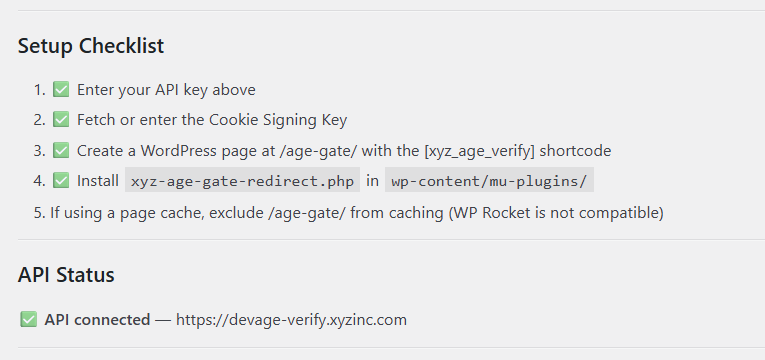
Settings page with setup checklist and API health check 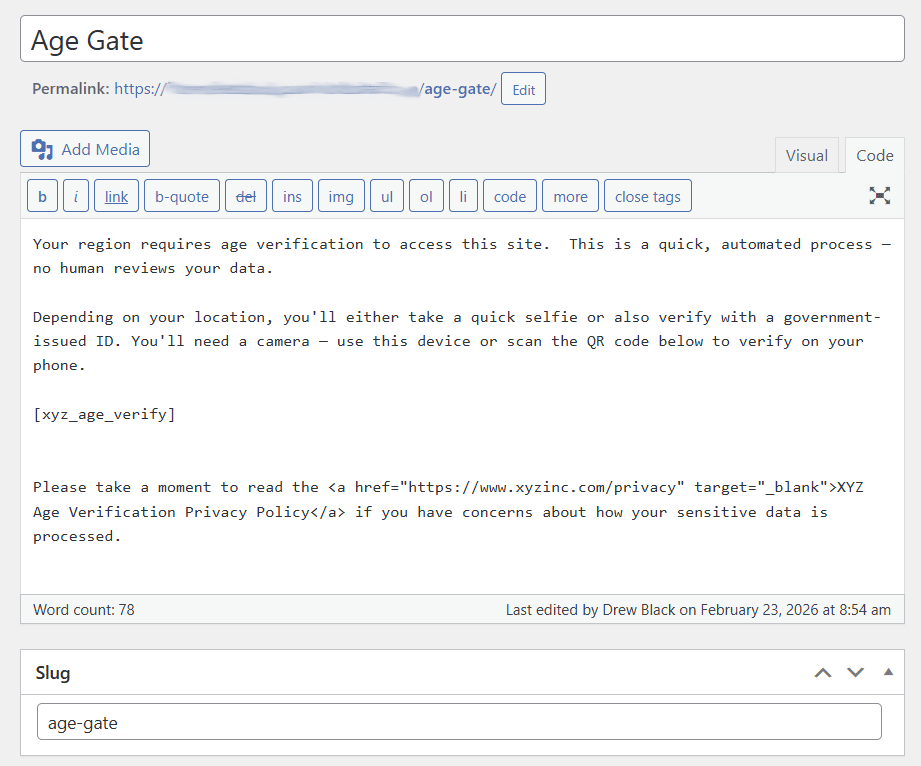
Age verification page with QR code and verification options 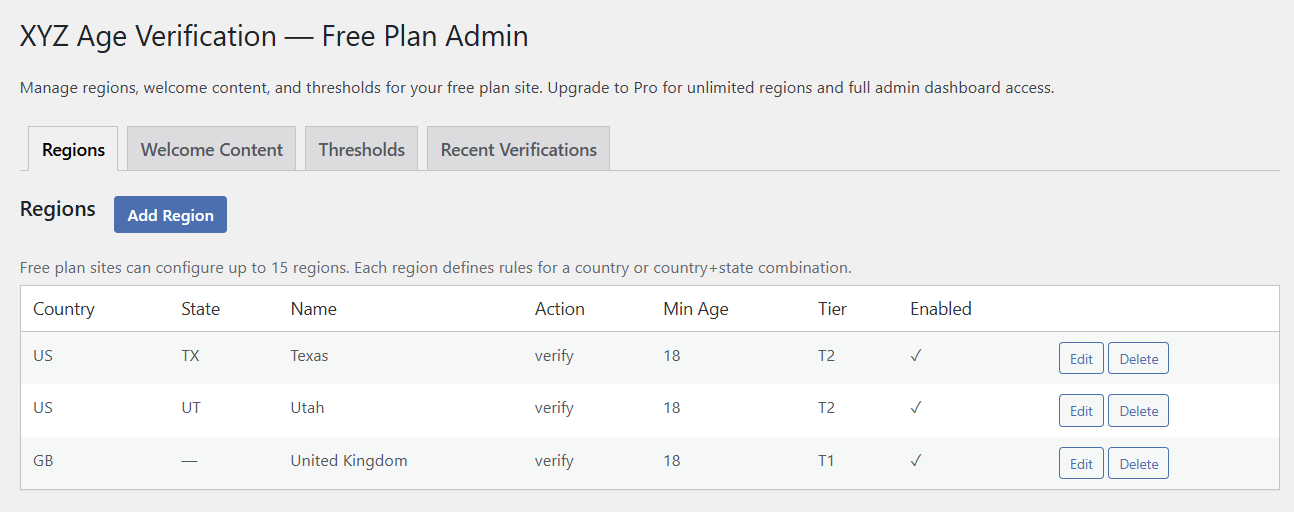
Region management with minimum age configuration 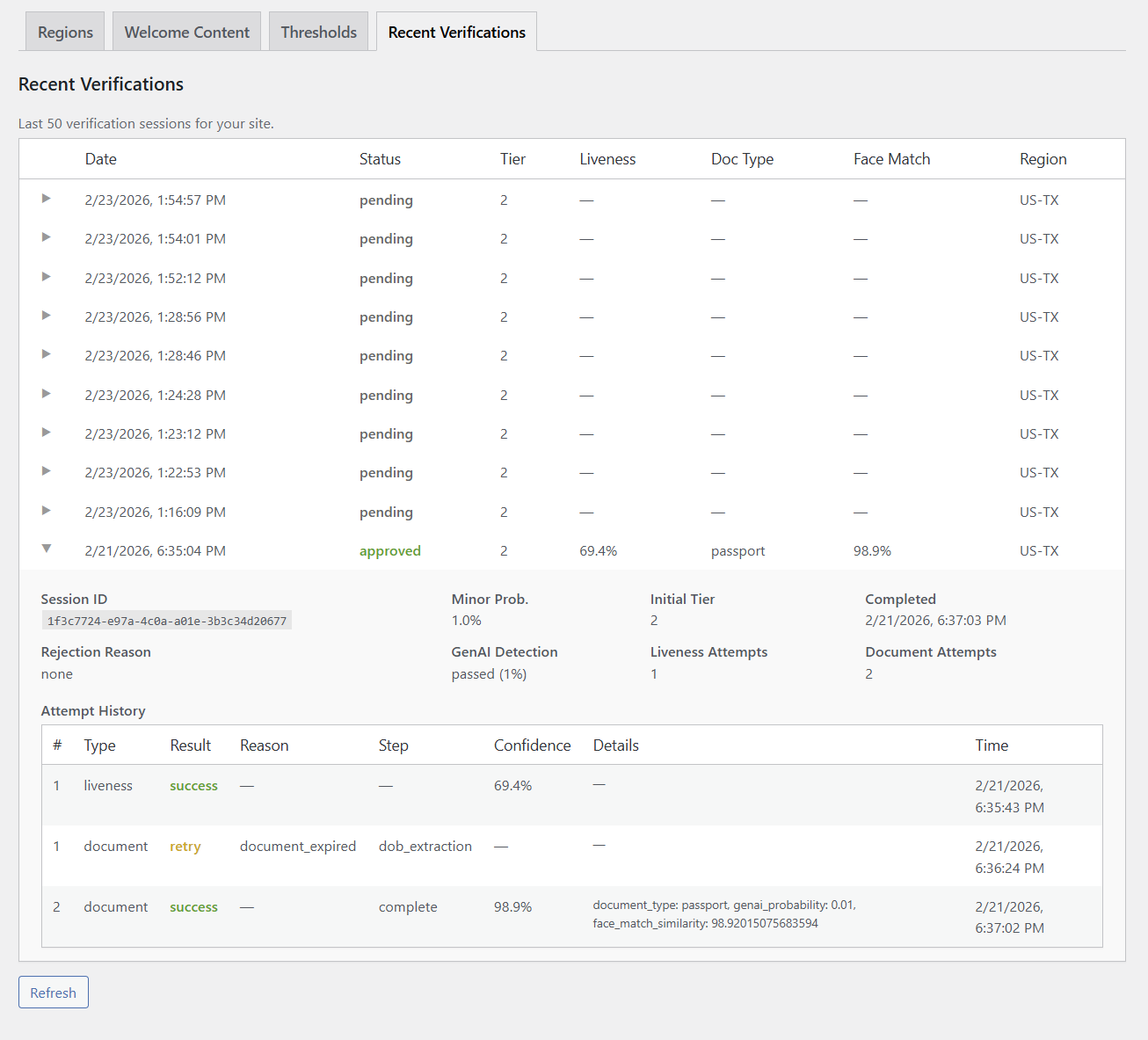
Exempt Paths tab — configure URLs that bypass the age gate 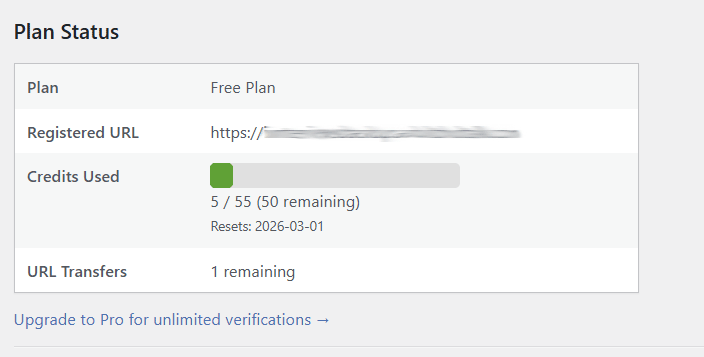
Recent verifications with detailed attempt history 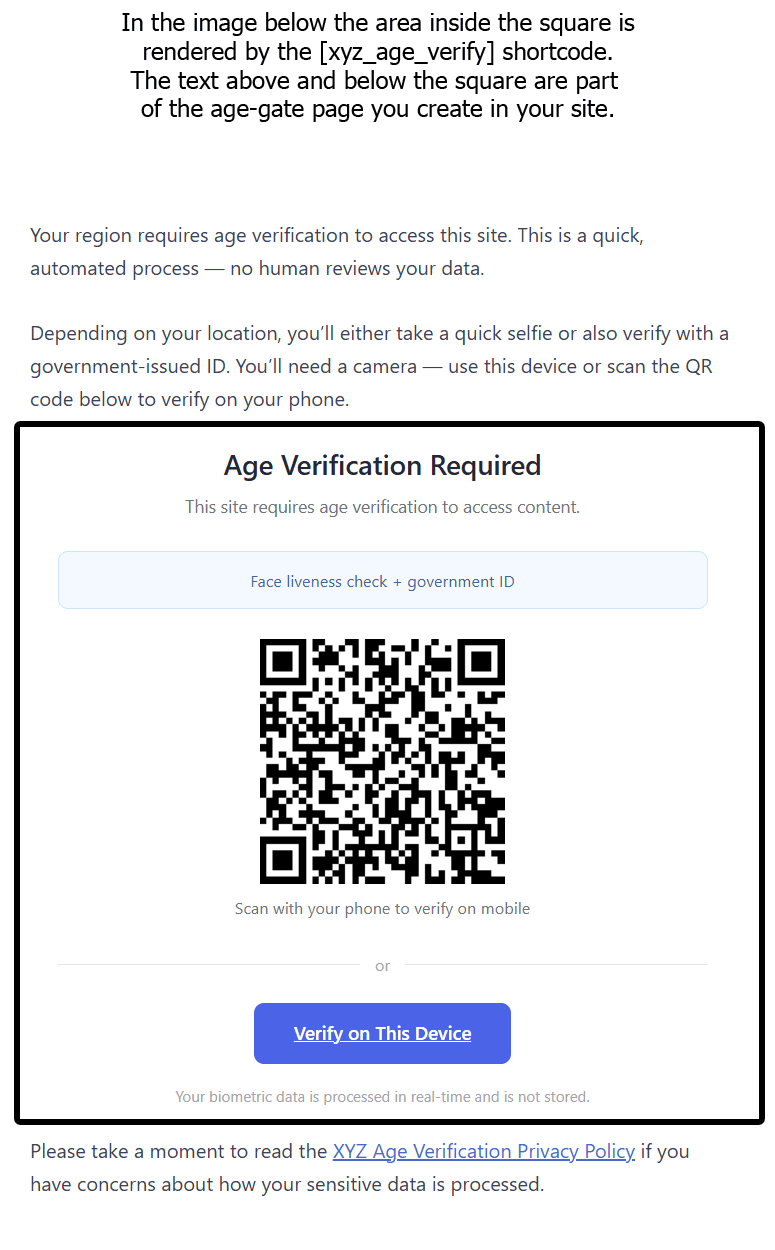
Plan status showing credit usage and remaining balance
Instalación
- Upload the
xyz-age-verification-freefolder to/wp-content/plugins/. - Activate the plugin through the “Plugins” menu in WordPress.
- Go to Settings > Age Verification.
- If you don’t have an API key, enter your email under “Get Started with a Free Plan” and click Start Free Plan. Check your email to confirm and receive your API key.
- Enter your API key in the settings.
- Click Fetch from API next to the Cookie Signing Key field to enable secure cookie verification.
- Create a WordPress page with the slug
age-gateand add the[xyzav_age_verify]shortcode to its content. - Copy
mu-plugin/xyz-age-gate-redirect.phpfrom the plugin folder to/wp-content/mu-plugins/. Create themu-pluginsdirectory if it does not exist. - Go to Settings > Free Plan to configure your regions, welcome content, and verification thresholds.
- If using a page cache plugin, exclude
/age-gate/from caching. Note: WP Rocket is not compatible (see FAQ). - Check the Setup Checklist on the settings page to verify all steps are complete.
Preguntas frecuentes
-
How is this different from other age verification plugins on WordPress.org?
-
Most plugins listed under “age verification” are technically age gates — a popup with a “Yes, I’m 18+” button or a date-of-birth dropdown. A minor can pass these in seconds by clicking the right button or picking a year. They satisfy a checkbox-level compliance requirement but do not actually verify that the visitor is an adult.
XYZ Age Verification performs real verification: a real-time selfie liveness check confirms a living person is present, and a trained classifier evaluates the probability that the person is a minor. Borderline cases automatically escalate to government ID verification. The result is a binary adult/not-adult determination backed by biometrics or a verifiable identity document — not a click.
If a self-declaration popup is sufficient for your compliance needs, plenty of free plugins offer that. If you need real verification because of OFCOM, US state laws, EU requirements, or your platform’s own policies, this plugin is built for that.
-
Where is my biometric data stored?
-
Nowhere. Selfies, liveness frames, and government ID images are processed in real time by the verification service and discarded immediately after the session completes — regardless of the outcome. The only data retained is the verification result (pass/fail), session metadata, a timestamp, and the visitor’s IP address (for fraud detection). Date of birth from ID documents is used transiently for age calculation and then discarded. Full details are in the Privacy Policy.
This is a fundamental architectural choice. The system does not maintain a database of faces, IDs, or verified identities, so there is no honeypot to breach.
-
Is this plugin free?
-
Yes. The plugin itself is completely free and open source. It connects to the XYZ Age Verification API, which includes a free plan with 100 verification credits per month — no credit card required. One credit is consumed per face liveness attempt, three credits total per document verification. Additional credit packs are available for purchase via PayPal at xyzinc.com/credits. Your first purchase includes 300 bonus credits and switches your site to a prepaid billing model — prepaid credits do not expire or reset monthly.
-
What are verification credits?
-
Credits represent verification attempts. Each face liveness check (Tier 1) costs 1 credit. Each document verification (Tier 2) costs 3 credits total. Your free plan includes 100 credits per month, resetting on the first of each month. Unused credits do not roll over.
-
How does the system decide when to ask for ID?
-
For age thresholds of 18, most visitors complete verification with a quick selfie. The liveness check includes a minor-probability assessment, and any result that crosses a conservative threshold automatically escalates to government ID verification. This means most adult visitors never see the ID step, while visitors whose appearance is ambiguous are asked for verifiable proof.
For age thresholds above 18 (e.g., 21+ for alcohol, cannabis, or certain firearms content), ID verification is always required because a selfie alone cannot establish a specific age — only a date of birth from an ID document can. The plugin enforces this automatically for any region configured with a minimum age above 18.
-
Does Tier 1 estimate the visitor’s age?
-
No. Tier 1 produces a binary adult/not-adult determination, not an age estimate. The underlying classifier evaluates the probability that the subject is a minor; this probability drives the pass, fail, or escalate decision. The system never claims to know a visitor’s age from a selfie. Specific age thresholds (21+, 25+, etc.) require Tier 2 because only an ID document supplies a verifiable date of birth.
-
What happens when my credits run out?
-
This depends on your API Failure Behavior setting. In “fail open” mode (the default), visitors are allowed through unverified. In “fail closed” mode, visitors are redirected to an error page until credits reset or you purchase additional credits. Verifications already in progress are allowed to complete. You can purchase credit packs at any time from xyzinc.com/credits — your first purchase includes 300 bonus credits.
European site operators with regulatory compliance obligations typically need “fail closed.”
-
Why does this plugin require Cloudflare?
-
The plugin uses Cloudflare’s
CF-IPCountryandCF-Region-Codeheaders to identify the country and (in the US) state that each visitor is connecting from. These headers are automatically added by Cloudflare’s network when your site is proxied through it. Without these headers, the plugin has no reliable way to determine where a visitor is connecting from, and region-specific verification rules cannot work.There is no alternative geo-detection method that meets the plugin’s accuracy and privacy requirements. Maxmind, IP2Location, and similar third-party databases are less accurate, require external lookups for every request, and would mean shipping IP addresses to additional services. Cloudflare’s headers are calculated server-side by Cloudflare itself, with no extra request needed.
For more detail, see: Why XYZ Age Verification requires Cloudflare.
-
The plugin shows a notice about missing Cloudflare headers. What does it mean?
-
The plugin checks for three Cloudflare headers on admin page loads and shows a diagnostic notice if any are missing. There are three possible states:
- No
CF-Rayheader at all — your site is not currently being served through Cloudflare. Either DNS migration is incomplete, or the proxy (orange cloud) is disabled on your A/AAAA records. Region-based verification cannot work until this is resolved. CF-Raypresent, but noCF-IPCountry— Cloudflare is in front of your site, but IP Geolocation is disabled. Enable it under Rules Managed Transforms Add visitor location headers in the Cloudflare dashboard. Available on the free plan.CF-IPCountrypresent, but noCF-Region-Code— country-level rules work, but US state and other subdivision-level rules will not. Enable the full “Add visitor location headers” Managed Transform (not just the country variant) in the Cloudflare dashboard. Available on the free plan.
The diagnostic reflects your current admin connection. If you administer the site via a VPN or another network that bypasses Cloudflare, the notice may appear even though visitors to your site are getting the headers correctly. The Cloudflare setup guide walks through verifying headers from a normal visitor connection.
- No
-
What does “setting up Cloudflare” actually involve?
-
Setting up Cloudflare means changing your domain’s nameservers at your domain registrar to point at Cloudflare. Once Cloudflare is your DNS provider, all DNS records (A, AAAA, MX, TXT, CNAME) are managed in the Cloudflare dashboard instead of at your registrar.
The migration has implications worth understanding before you begin:
- Email records must be preserved. If your domain has email (MX records, SPF, DKIM, DMARC), those records must be re-created in Cloudflare exactly as they were before. If they are not, your email will stop working.
- Existing services that depend on DNS — subdomain configurations, third-party integrations that ask you to add TXT records, SSL certificates managed outside Cloudflare — may need attention.
- DNS changes are not instant. Nameserver changes can take up to 48 hours to propagate worldwide. Mistakes made during migration are not immediately reversible.
If you have never managed your own DNS, or if your site’s email and other services are configured by someone else (a web host, an IT contractor), please read the Cloudflare setup guide before installing this plugin. The guide focuses specifically on preserving email and other services during the migration.
If migrating to Cloudflare is not something you are comfortable doing or paying someone to do, this plugin is not the right choice. Simpler self-declaration age gate plugins do not require infrastructure changes, but they are not real verification — they are popups with no enforcement. Choose based on what your compliance obligations actually require.
-
Can visitors see my homepage or registration page without going through verification?
-
Yes, as of version 2.5.4. The plugin supports an Exempt Paths list — specific URLs that bypass the age gate entirely, even for visitors from gated regions. Common uses:
/— your homepage, so visitors can see what the site is before deciding to verify/privacy-policy/,/terms/— legal pages that must be accessible without verification/register/,/login/,/contact/— onboarding and contact pages
Exact paths and
/*wildcard prefixes are supported (e.g.,/public/*exempts everything under/public/). Configure exempt paths in the new Exempt Paths tab in the plugin admin.Important: do not exempt paths that contain age-restricted content. Exemption means the path is accessible to all visitors regardless of region — including any underage visitors who might attempt to reach it directly.
-
What happens if the API is unreachable?
-
The behavior is controlled by the API Failure Behavior setting on the Age Verification settings page. “Fail open” (the default) allows visitors through unverified to prevent your site from going offline. “Fail closed” redirects visitors to an error page. Sites with compliance obligations should generally use “fail closed.”
-
What is the must-use plugin for?
-
The MU plugin (
xyz-age-gate-redirect.php) runs early in the WordPress loading process, before most plugins. It checks Cloudflare geo headers and the verification cookie on every request, redirecting unverified visitors to the age gate page. This early execution is essential for the gate to work reliably and to prevent unverified visitors from briefly seeing protected content. -
Is this plugin compatible with WP Rocket?
-
No. WP Rocket’s page cache serves static HTML files via its
advanced-cache.phpdrop-in, which executes before must-use plugins load. This means WP Rocket can serve cached pages to unverified visitors, bypassing the gate entirely. WP Rocket does not currently offer a way to conditionally cache based on cookie presence. Other page cache plugins that respect the standard WordPress loading order are compatible — just exclude/age-gate/from caching. Confirmed compatible: WP Super Cache (Simple mode only), Jetpack Boost, and W3 Total Cache. -
Can visitors bypass the gate with browser dev tools?
-
The verification cookie is cryptographically signed using HMAC-SHA256. Setting a fake cookie value will not pass signature verification. The verification logic runs at the must-use plugin level before any plugin-level code that could be tampered with via WordPress filters or hooks.
-
Will the gate block me from my own WordPress admin?
-
No. The
/wp-admin/area and the login page are always exempted. All logged-in WordPress users are automatically bypassed at the redirect level, so administrators, editors, and other authenticated users will not encounter the gate while browsing the site. -
How does this work with membership or subscriber sites?
-
The gate runs at the must-use plugin level, which executes before WordPress loads user roles. At this stage the plugin can detect that a visitor is logged in but cannot distinguish between an administrator and a regular member. As a result, all logged-in WordPress users bypass the gate, not just administrators.
For most sites this is not an issue — anonymous visitors are verified before they can register or log in, so members have already passed verification. However, if your site requires re-verification for content that logged-in members can also access (e.g., tiered content where some sections require re-verification), this plugin alone is not a fit for that use case. Plan your registration flow with this behavior in mind.
If you need tighter integration with membership levels — for example, requiring different verification tiers for different membership levels, or protecting media files based on membership — XYZ Protect integrates directly with MemberPress and Paid Memberships Pro to provide membership-aware authorization. It is a separate licensed plugin available at xyzinc.com.
-
The Cookie Signing Key is an HMAC-SHA256 secret used to cryptographically sign verification cookies. This prevents visitors from forging a verification cookie. The key is generated per-site by the XYZ API. Click “Fetch from API” on the settings page to set it up automatically.
-
How do I know if the plugin is configured correctly?
-
The settings page includes a Setup Checklist that shows green checkmarks for completed steps and red Xs for missing items. There is also an API Status indicator that tests the connection to the XYZ verification API. Click the Help tab at the top-right of the settings page for a full setup guide and troubleshooting tips.
-
How do I test the age gate without being in a configured region?
-
Enable Test Mode in Settings > Age Verification. Once enabled, anyone can add a
?reg=query string parameter to any page URL to simulate a visitor from that region. For example,?reg=US-TXsimulates a visitor from Texas, USA, and?reg=DEsimulates a visitor from Germany. Test mode bypasses both the verification cookie and the logged-in user exemption, so you experience the full verification flow. This works in incognito/private browsing windows without a WordPress login, which is the most common way to test as an anonymous visitor. Remember to disable test mode when you are finished — a persistent admin notice will remind you. -
Does this plugin protect files in wp-content/uploads?
-
No. The gate applies to WordPress pages and posts — it does not restrict direct access to media files served from
/wp-content/uploads/. If a visitor knows or guesses the direct URL to an uploaded file, they can access it without verification. This is a limitation of the WordPress architecture: media files are served directly by the web server (Apache/Nginx) and do not pass through WordPress’s PHP execution. Protecting uploaded files requires server-level configuration beyond what a free WordPress plugin can provide.For full media file protection alongside age verification — covering images, videos, PDFs, and audio in
/wp-content/uploads/— see XYZ Protect at xyzinc.com. XYZ Protect adds a Cloudflare Worker layer that authorizes every media request before serving the file. -
What is the minimum age setting?
-
Each region can have its own minimum age threshold (default is 18). For regions with a minimum age above 18, the plugin automatically requires Tier 2 verification (government ID) because Tier 1 (face liveness) can only assess minor probability, not exact age. The ID document is needed to extract the date of birth for precise age calculation.
Reseñas

Colaboradores y desarrolladores
Este software es de código abierto. Las siguientes personas han contribuido a este plugin.
Colaboradores
Traduce “XYZ Age Verification” a tu idioma.
¿Interesado en el desarrollo?
Revisa el código, echa un vistazo al repositorio SVN o suscríbete al registro de desarrollo por RSS.
Registro de cambios
2.5.7
- New setting: Allow Verified Bots on the main settings page. Previously, the MU plugin unconditionally let any request carrying a
verified-bot: trueheader skip the age gate. That bypass is now operator-controlled via a checkbox (default enabled, so behavior for existing sites is unchanged). Disable if you want verified crawlers (Googlebot, Bingbot, etc.) to be redirected to the age gate alongside regular visitors. The header is populated by the Cloudflare Request Header Transform Rule described in the setup guide; if you have not configured that rule, this setting has no observable effect.
2.5.6
- Fix: the Cloudflare-header admin notice introduced in 2.5.4 would false-positive for operators whose wp-admin route deliberately bypasses Cloudflare (private reverse proxy on admin, separate admin hostname, Cloudflare Tunnel for admin only, etc.) — common and legitimate setups where the front-end is fully proxied and the age gate works perfectly for visitors. The check now probes the public front-end (via a token-gated REST endpoint). Probe result is cached for 12 hours, with a “Re-check now” link in the notice itself. All three diagnostic tiers (CF not proxying, IP Geolocation off, Managed Transforms off) are still distinguished.
2.5.5
- Fix: the “Bypass Cookies” textarea on the main settings page would reject every value with
Bypass cookie name "["cookie"]" contains invalid characters, regardless of what the operator typed, and silently clobber the stored value back to empty. The bug had been present since at least 2.4.2.
2.5.4
- New feature: Exempt Paths — operators can now configure specific URL paths (homepage, privacy policy, registration, etc.) that bypass the age gate entirely, even for visitors from gated regions. Supports exact paths and
/*wildcard prefixes. Configure in the new Exempt Paths tab in the plugin admin. - New diagnostic: admin notices now detect missing Cloudflare geo headers and explain which Cloudflare dashboard setting needs to be enabled. Three-tier detection covers “not behind Cloudflare at all,” “IP Geolocation disabled,” and “country detection working but subdivision detection missing.”
- Documentation: clarified that Cloudflare proxying is a deployment prerequisite, not a feature flag. Added explicit guidance on DNS migration implications (email preservation, propagation time, scope of change) and links to Cloudflare setup support articles. Made clear that this plugin is not appropriate for site owners not prepared to manage their own DNS.
2.5.3
- MU plugin is now auto-installed on plugin activation and self-heals on every page load if missing or out of date. Fixes a class of silent failures where a stale MU file left behind from a much earlier plugin version (using the old
xyz_av_*option namespace) would partially match region rules — state-specific rules added later would redirect correctly, but country-wide rules would silently fail. - New admin notice distinguishes MU plugin “not installed” from “out of date” from “wp-content/mu-plugins/ not writable”, and only fires when the on-init auto-repair could not fix the situation.
2.5.2
- Documentation: readme overhaul focused on positioning and discoverability — clarified the distinction between age gates and real age verification, expanded FAQ with terminology and compliance context, added “When you need this plugin” section.
- Fix: editing or deleting a country-wide region (no state code) from the admin no longer returns a 404. The plugin now sends the API’s documented
-placeholder in the URL path when state code is empty. - Tested with WordPress 7.0.
2.5.1
- Credit pack purchasing via PayPal — purchase additional credits directly from xyzinc.com/credits
- First credit pack purchase includes 300 bonus credits and switches the site to prepaid billing (replaces monthly free credit allocation)
- Plan status panel now displays Prepaid plan with credit balance and purchase link
- Free plan users see bonus credit incentive on the settings page
2.5.0
- Interstitial consent gate before session creation — no API call on page load, eliminating passive bot session consumption
- Biometric consent checkbox serves as explicit user consent capture (supports BIPA/CIPA compliance requirements)
- HMAC-signed timing gate rejects automated interactions faster than 1 second after page render
- Visitor IP address now passed to the API for per-IP rate limiting (CF-Connecting-IP with REMOTE_ADDR fallback)
- Verification UI dynamically rendered after consent via AJAX — same QR code, popup, and polling functionality
- Added FAQ about wp-content/uploads limitation
- Added planned features: media file protection and additional credit packs
2.4.2
- MU plugin: replaced cookie array iteration with direct computed cookie name lookup
- MU plugin: enhanced phpcs:ignore annotations with detailed technical justifications
2.4.1
- Plugin display name simplified to “XYZ Age Verification” (removed redundant “Free”)
- Migrated Free Plan Admin data operations from AJAX to WP REST API (regions, content, thresholds, verifications)
- Added HMAC verification to MU plugin redirect URLs for enhanced input validation
- Documented QRCode.js third-party library source and license in readme
- Added xyzageverify to plugin contributors
2.4.0
- Aligned text domain with WordPress.org assigned slug (xyz-age-verification-free)
- Renamed all plugin identifiers to use xyzav_ prefix for WordPress.org compliance
- Replaced inline scripts with properly enqueued JavaScript
- Removed WordPress.org directory asset files from plugin ZIP
- Added Domain Path header and languages directory
2.3.0
- Free plan registration directly from the plugin settings (100 credits/month, no credit card)
- Built-in admin page for managing regions, welcome content, and thresholds
- Detailed verification history with expandable attempt details
- Minimum age setting per region with automatic Tier 2 enforcement for thresholds above 18
- Configurable fail-open/fail-closed behavior for API outages and credit exhaustion
- Credit usage tracking with monthly reset
- Site URL binding for free plan API keys
- Test mode now works for all visitors (incognito window testing support)
- Verification cookie HttpOnly flag disabled in test mode for easier testing
- Plugin renamed to XYZ Age Verification
2.2.0
- Test mode: simulate any region with ?reg=US-TX query string
- Cryptographically signed verification cookies with per-site HMAC-SHA256 keys
- Logged-in WordPress users automatically bypass the age gate redirect
- Setup checklist with status indicators on the settings page
- API connection health check on the settings page
- Admin notices for missing API key, MU plugin, age-gate page, and signing key
- Contextual help tabs with overview, setup guide, settings reference, and troubleshooting
- Restructured plugin with properly enqueued CSS and JS assets
- Replaced external QR code service with bundled local generation (privacy improvement)
- Added configurable bypass cookies for pre-verified users
- Added internationalization (i18n) support for all user-facing strings
- Added uninstall cleanup for all plugin options
- Added activation hook with PHP and WordPress version checks
- Added version constant for asset cache busting
- Fixed file extension for proper WordPress plugin loading
- Removed hardcoded client-specific default values
- Added Host header security documentation in MU plugin
2.1.0
- Removed region query parameter override vulnerability (critical security fix)
- Added nonce and capability checks to admin tool actions
- Added sanitization callbacks to all registered settings
- Added session ID format validation in AJAX poll handler
- Removed client-specific hardcoded bypass cookies from MU plugin
2.0.0
- Initial public release
- Two-tier verification (face liveness + government ID)
- Region-specific rules via Cloudflare geo headers
- QR code and popup verification options
- Server-side API key handling
- MU plugin architecture for early redirect (not compatible with WP Rocket page cache)