
Descripción
NGG Smart Image Search will provide a highly customizable search and display functionality for images in NextGEN Galleries. Search results can be displayed in various layouts including all original NextGEN galleries.
You find more infos and examples on the plugin website.
An image search will be carried out across title, description, filename and tags (as configured per widget or shortcode) of all images in arbitary selectable NextGEN search galleries. There are two search modes available. The basic search mode will look for images which satisfy at least one of the search terms (logical or). The extended search mode will look for images which satisfy all search terms (logical and).
The search result list can be displayed in various ways.
- you can use any of the native NextGEN Galleries to display the search result list.
- you can also use any of the NextGEN Pro / Plus Galleries with all their features including ecommerce.
- you can use any available NextGEN Gallery settings.
- you can use single image lists providing additional image meta data.
- you can use an advanced thumbnail list which is independant of NextGEN Gallery code.
- you can sort the search result list in various ways.
- you can use paging for long search result lists.
You can enter search strings via widgets or shortcodes. You can use complex predefined searches to display an almost arbitrary collection of NextGEN Gallery images. You can dynamically switch the search mode or the display mode between searches. Searches can be configured differently for public users or for logged in (private) users.
For an extended documentation see qualified search examples or display search result list.
The new version 3 of the plugin is a major update of version 2 with many new functionalities and some optimization and error corrections.
Capturas
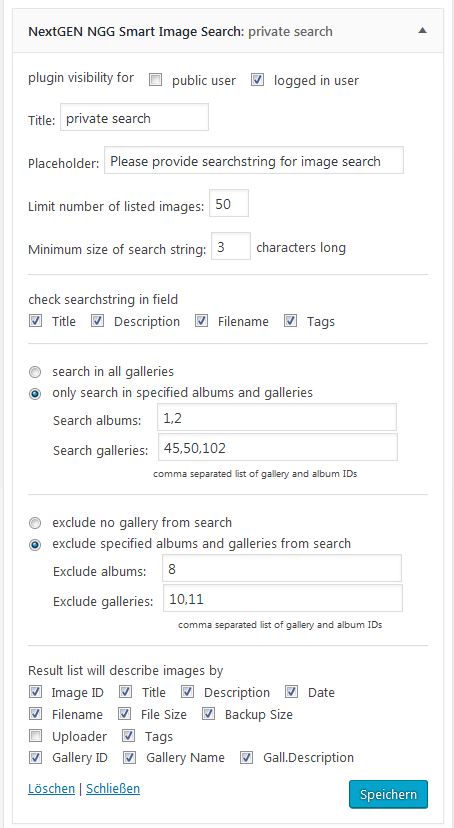
widget display for search definition 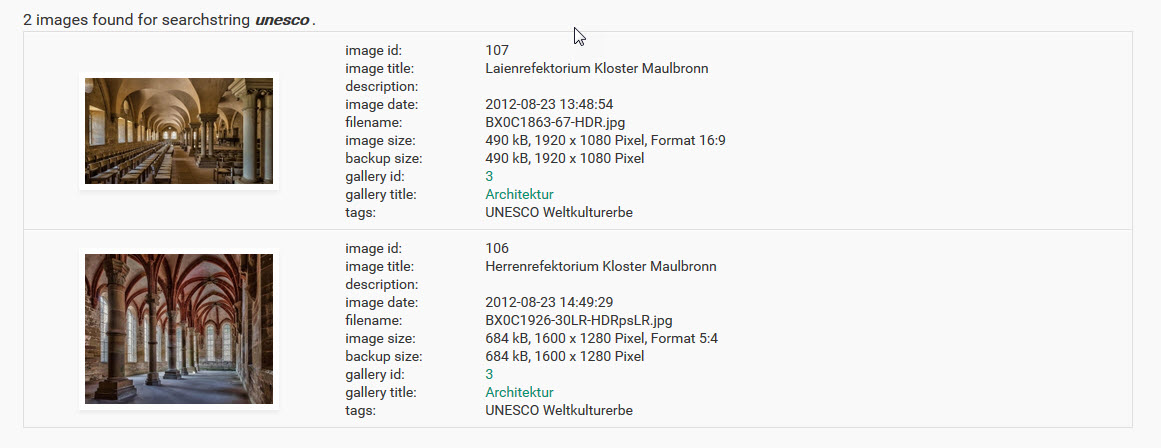
single image search result list 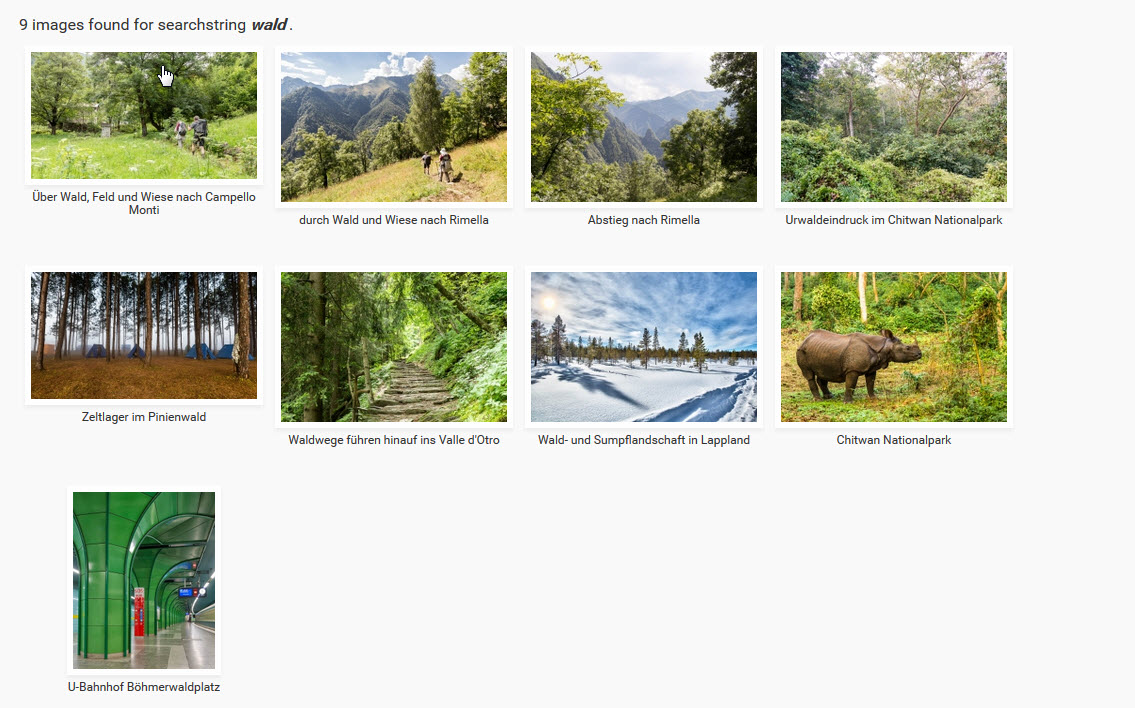
advanced thumbnails search result list 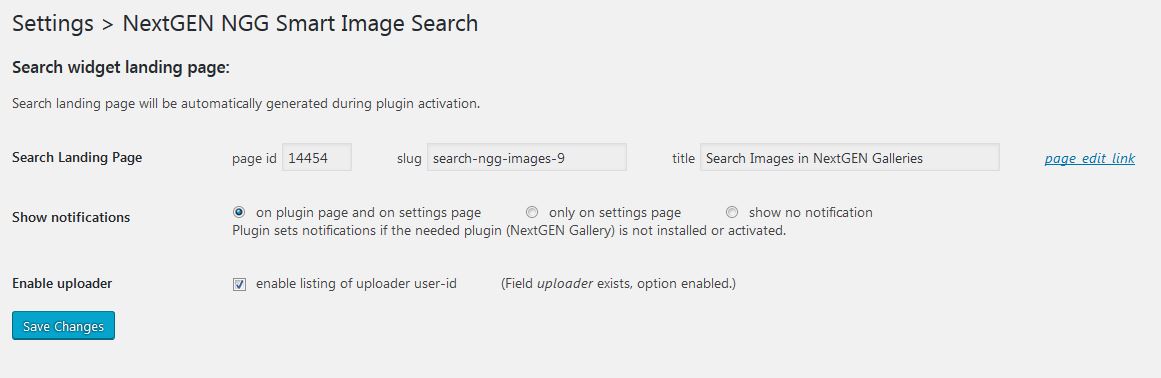
settings page 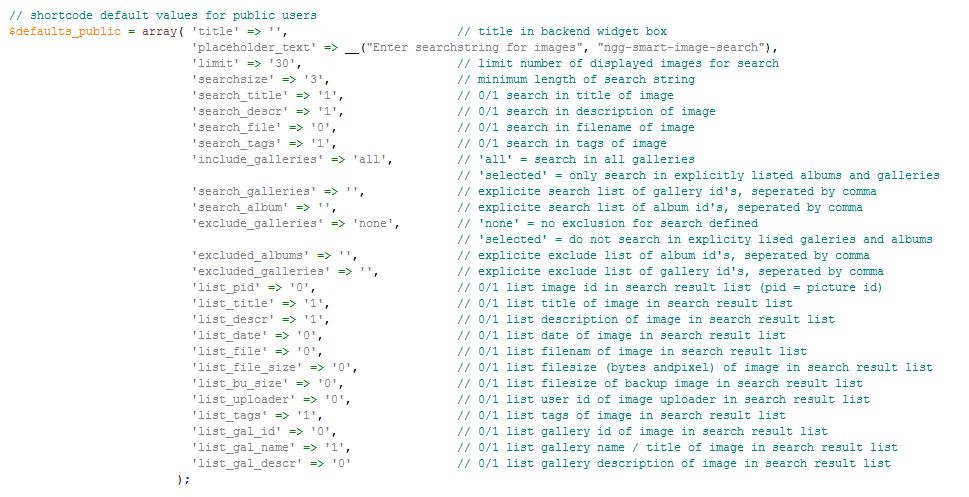
shortcode default parameters for public users 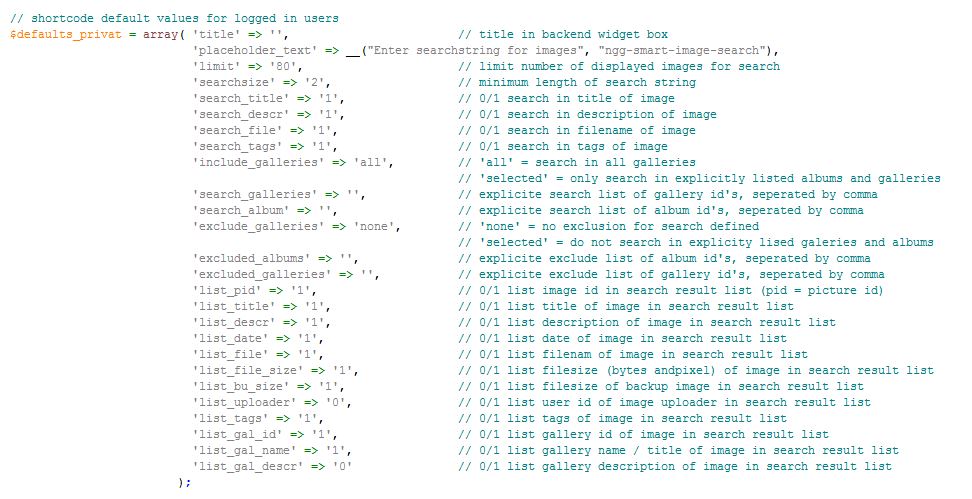
shortcode default parameters for logged in users
Instalación
- Upload
ngg-smart-image-searchto the/wp-content/plugins/directory - Activate the plugin through the ‘Plugins’ menu in WordPress
- Adjust settings, widget parameters and shortcodes as necessary
Preguntas frecuentes
-
How does the search work ?
-
There are three possibilities to perform a search for images:
(1) Use a dynamic search field in a sidebar widget.
The plugin comes with a widget “NGG Smart Image Search”. If you use this widget, it will provide a search field in the sidebar. Entering text in the search field will send the input to an automatically generated search page. This search page is described on the settings page of the plugin. You can freely customize this search page.
The search page will use a shortcode [hr_SIS_display_images] to generate and display the result list.(2) Use a dynamic search field provided by the shortcode [hr_SIS_nextgen_searchbox].
This shortcode searchbox can be placed on any post or page (also on the automatically generated search page).
Entering text in this searchfield will send the input to the shortcode [hr_SIS_display_images], which must be placed on the same page. Otherwise you won’t get any search results. The shortcode [hr_SIS_display_images] will generate and display the search result.(3) Use a predefined static search input as parameters with the shortcode [hr_SIS_display_images].
In this case the shortcode [hr_SIS_display_images] will only display the static search result and will ignore all dynamic search inputs. -
How can a search be customized ?
-
You can freely specify the scope of the image search by listing or excluding arbitary collections of galleries and/or albums.
You can also specify the listed meta fields per image in a single/linked search result list.You can do this separately for public users and for logged in users.
If you do it by using search widgets, you define separate widgets for public users and for logged in users. Users will only see one widget which is relevant for them.
If you use a searchfield shortcode [hr_SIS_nextgen_searchbox] you specify your customization by parameters (see screenshots for a complete list of parameters).
By default parameters are initiated differently for public users and for logged in users (see screenshots).
You can overwrite these settings by specifying the parameters in the searchbox shortcode.
E.g. parameter list_descr=”1″ will list the image description in the result list for all users.
If you want to set this parameter only for public users, you use prefix “pu_”, i.e. pu_list_title=”1″.
If you want to set this parameter only for logged in users, you use the prefix “lo_”, i.e. lo_list_descr=”1″. -
How can the result list be customized ?
-
The result list is generated by the shortcode [hr_SIS_display_images]. This shortcode accepts a display parameter to select the result list layout.
There are several options available:(1) use any of the NextGEN Galleries
The easiest way to set up a NextGEN Gallery display is to define the display with an arbitrary NextGEN Gallery on a post or page. Then switch to text mode and replace the generated ‘ngg’ shortcode name by ‘hr_SIS_display_images’. This shortcode is provided by the plugin NGG Smart Image Search. This shortcode will generate the searxh result list. It will then dynamically call the NextGEN Gallery shortcode and passing the needed parameters.
You can use a short form of display codes:- display=’bt’ (for a Basic Thumbnail gallery)
- display=’pt’ (for a Pro Thumbnail Gallery)
- display=’ma’ (for a Pro Masonry Gallery)
- display=’mo’ (for a Pro Mosaic Gallery)
(2) display=”si” or display=”ngg_single_images”
This will generate a detailed result list in table format showing found images and their describing fields.
The images are displayed using the native NextGEN Gallery shortcode for displaying single images.
Clicking on an image will open the image in the lightbox as defined on the NextGEN Gallery setting page. The lightbox will only display a single image, no skipping to next found image.(3) display=”li” or display=”linked_images”
This will generate the same result list as in option (1).
However, the found images are here displayed using explicite image links generated by this search plugin.
For this option you should configure NextGEN Gallery so that the standard NextGEN Gallery lightbox will also work for all other linked images.
Doing this you can again open each listed image in the standard NextGEN Gallery lightbox.
However, now you can skip all images in the lightbox, you do no longer have to click on each image first.(4) display=”at” or display=”advanced_thumbnails”
This will generate a proportional thumbnails grid for all found images.
Furthermore, the image title is listed for each thumbnail.
The result list consists of linked images. As for display type (2), you should configure NextGEN Gallery so that the standard NextGEN Gallery lightbox will also work for all other linked images.In addition you can set further parameters to define the search result list layout. You can specify a sort order, a paging option, a limit parameter etc..
-
What search strings can be entered ?
-
You can enter any sensible search text.
In basic search mode the plugin will first determine all search items in the search string which are seperated by blanks (whitespace). It will then look for images which have at least one of the search items enclosed in their selected meta data fields (corresponds to a logical OR condition).
In extended search mode the plugin interprets the search string differently. Now it takes the whole text, including entered spaces, as a single search item unless it finds predefined delimiters. These delimiters again seperate the search string into seperate search items.
For logged in users or for static searches there is a special search option available: g:<gallery id>.
This will list all images of the gallery with Id <gallery id>.
The result list will also provide the gallery name and gallery id with underlying links to the backend gallery administration page or to the gallery page, if such a page is defined for the NextGEN Gallery in the backend.There are other special search options available like r:<number> for searching most recent images or l:<number> for last uploaded images.
You can also do multi-keyword searches like “sun & clouds & summer” which will search for all images satisfying all three single search conditions (in the given example).
You can negate searchstrings by “&- searchstring”.
You can restrict searchstrings to dedicated fields like “&t sun &t clouds” which will only search in tags.A search string can have an escape character +/- at the beginning to switch between basic and extended search mode. It can have escape options at the end to switch dynamically between display options.
For an extended documentation see qualified search examples.
Reseñas


Colaboradores y desarrolladores
Este software es de código abierto. Las siguientes personas han contribuido a este plugin.
Colaboradores
"NGG Smart Image Search" ha sido traducido a 1 idioma local. Gracias a los traductores por sus contribuciones.
Traduce "NGG Smart Image Search" a tu idioma.
¿Interesado en el desarrollo?
Revisa el código, echa un vistazo al repositorio SVN o suscríbete al registro de desarrollo por RSS.
Registro de cambios
3.2.1
This is a recommended error fix, uploaded 2024-02-27.
*Fixed: widget parameters were not passed correctly to the backend, were instead replaced by defaults
3.2.0
This is a recommended maintenance update, uploaded 2024-02-24.
*Enhanced: advanced thumbnail and linked image display now use current fancybox lightbox (no jquery-dependency) independent of NextGEN Gallery
*Enhanced: a wrapper for shortcode searchbox included to improve search icon display
*Fixed: Modernizr.Canvas use removed for showing additional paging buttons on top of searchresultlist
*Fixed: searchbox was crashed by wordpress wptexturize function when used with new block themes
*Fixed: display type advanced thumbnails showed no thumbnails because NextGEN Gallery changed thumbnail names
*Fixed: Some minor issues like php warnings for undefined variables resolved
*Remarks: The searchbox styling is highly dependant on individual theme definitions. Very often there will be a need for additional CSS customization.
3.1
This is a recommended maintenance update, uploaded 2019-04-17.
*Fixed: Javascript compatibility issues with certain themes on backend pages
*Fixed: Some minor issues
*Remarks: The searchbox styling is highly dependant on individual theme definitions. Very often there will be a need for additional CSS customization.
3.0
This is a major functional release update, uploaded 2018-12-11.
*NEW: Enabling paging for search results
*NEW: Definde a new basic search mode
*NEW: Enabling ALL NextGEN native galleries for displaying the search result liust
*NEW: Enabling NextGEN e-commernce option for the search result list
*NEW: Enabling NextGEN template files for displaying the search result list
*NEW: Providing new sort options for the search result list
*NEW: Providing a target parameter for the search shortcode to explicitly address the post/page for displaying the search result list
*Enhanced: customization of thumbnails and searchboxes
*Enhanced: Setting page adjusted for search mode settings
*Fixed: Landing page issues are corrected. Landing page is no longer duplicated upon reactivation of the plugin. A deleted landing page will be regenerated upon reactivation of the plugin.
*Fixed: New version of NextGEN Gallery Pro/Plus will now be recognized for dynamic display options.
*Fixed: Various minor adjustments
2.1
This is a maintenance update, uploaded 2017-02-28.
- Fixed: multi-keyword search for multiple tags is now working as designed
- Changed: the default gallery display options for NextGen Galleries (standard and pro / plus) are now set according to the NextGen gallery settings.
- Updated: documentation is being updated and corrected
2.0
This is a major functional update, uploaded 2017-02-07.
- NEW: advanced searches can be defined combining multiple searchstrings by a logical AND condition
- NEW: searches can now be dynamically restrited to single searchfields
- NEW: result list can be displayed as an advanced thumbnail gallery featuring proportional images and title text in a grid
- NEW: result list can be displayed as a regular nextgen plus/pro gallery (pro thumbnail, pro masonry, pro mosaic) if this premium plugin is installed
- NEW: special search code ‘r:nn’ will display the nn most recent images according to their exif exposure date
- NEW: special search code ‘l:nn’ will display the nn last uploaded images
- NEW: display shortcode now can also show a predefined static search result
- Fixed: if the landing page gets deleted by any reason it is now rebuild during activation of the plugin (of course, you have to deactivate it first)
- Updated: plugin documentation is updated in the plugin directory
- Updated: plugin documentation on the plugin website
- Changed for better readability: display type has been renamed from single_images to ngg_single_images and shortcode hr_SIS_display_images is renamed to hr_SIS_display_images