
Descripción
Captcha/Honeypot (CF7, Avada, Elementor, Comments, UltimateMember, WooCommerce, WPForms) allows you to easily activate custom rules, captchas and ip based protection settings which will stop unwanted spam.
You can decide which captcha you prefer. Either use a honeypot, an arithmetical or an image cgitaptcha to protect your forms.
Did you find this plugin helpful? Please consider leaving a 5-star review.
Captcha protection can be activated globally for all forms or only locally for specific forms.
Additional settings like the time based protection allows you to define, how often a visitor can submit a form between two time periods. This will allow
you to easily stop bots from using forms over and over again to send multiple spam messages.
It is also possible to activate a timer which will pretend form submitting for a given period. Depending on the form, only bots will be able
to submit these within seconds. Therefor you can enable this function to use this advantage to identify bots and stop them from sending spam.
The captcha plugin is easy to use, everything can be manged from the custom interface which will allow you to enable all necessary settings within
seconds.
⭐ Features ⭐
- Supports WPForms
- Supports Avada Forms
- Supports Contact Form 7
- Supports Elementor Forms
- Supports Gravity Forms
- Supports WooCommerce Registration & Login
- Supports WordPress Login, Registration & Comments
- Supports Arithmetic Captcha
- Supports Honeypot Captcha
- Supports Image Captcha
- Supports IP Ban/Blocking
- Supports Ultimate Member Registration
- Browser Detection for Crawler and Bots
- URL Filter to limit the number of Links in forms
- BB Code filter integrated
- Customize error messages for your customers
- Enable time based protection to increase the spam protection
- Add multiple submission protection for forms
- Optimize your protection by using different captcha methods for different forms.
- Easily create or add our blacklist to your website. Block thousands of words in different languages with one click.
- GDPR/DSGVO Ready – No cookies used, IP-Addresses stored by one way encryption.
- Install, Enable and stop Spam within seconds.
Protection Mechanics
The Plugin supports the following mechanics to reduce/stop spam:
- Captcha (Methods: Arithmetic, Honeypot, Image)
- Blacklists (easily import our blacklist with one click)
- Filter Rules (URL Filter, BB Code Filter, Blacklist)
- Time Based Protection
- IP Ban Protection
- Multiple Submission Protection (Avada, CF7 & Elementor)
- Browser Validation – recognize bots by user agent and more.
- Javascript Validation – recognize bots by javascript validation.
What’s new in 1.10.0
- New: Added Captcha, JavaScript, Rule & Browser Validation support for Gravity Forms.
- Fix: Updated Spelling in WPForms JavaScript Validation.
- Update: Updated the default settings to support Gravity Forms settings.
What’s new in 1.9
- New: Added Captcha support for WPForms.
- Fix: Updated the default settings to recognize the protection level correct.
What’s new in 1.8
- New: Added JavaScript Validation – Increased spam protection while checking for php, javascript and browser validation. Less spam, more leads.
What’s new in 1.7
- New: Added the option to enable the reload of image & arithmethic captchas by user.
- New: Added Browser validation as additional protection method.
- New: Added the custom security level – it will automatically selected if you customize the settings.
What’s new in 1.6
- New: Added support for the Ultimate Member Plugin Registration & Login Form
- Fix: Fixed a issue with contact form 7 not adding the global captcha field correct if the submit button has been customized.
What’s new in 1.5.1
- New: Added captcha protection option for WordPress registration (Arithmetic, Honeypot & Image)
- New: Added captcha protection option for WooCommerce registration (Arithmetic, Honeypot & Image)
- New: Added captcha protection option for WooCommerce login (Arithmetic, Honeypot & Image)
- New: Added Arithmetic & Image Captcha for CF7 (global)
- New: Added Arithmetic & Image Captcha for Avada Forms (global)
- New: Added Arithmetic & Image Captcha for WordPress Comments (global)
- New: Added Arithmetic & Image Captcha for WordPress Login (global)
What’s new in 1.5.0
- New: Added the option to enable the multiple submission protection for contact form 7.
- New: Added the option to rename the honeypot field for contact form 7.
- New: Added the option to enable the multiple submission protection for avada forms.
- New: Added the option to enable the multiple submission protection for elementor forms.
Privacy
This plugins does not track users, nor does it use cookies or send data to external servers. If you use the IP based protection, the IP-Address
of the form submitter will be stored with a one-way encryption for the maximum of 2 month.
Capturas
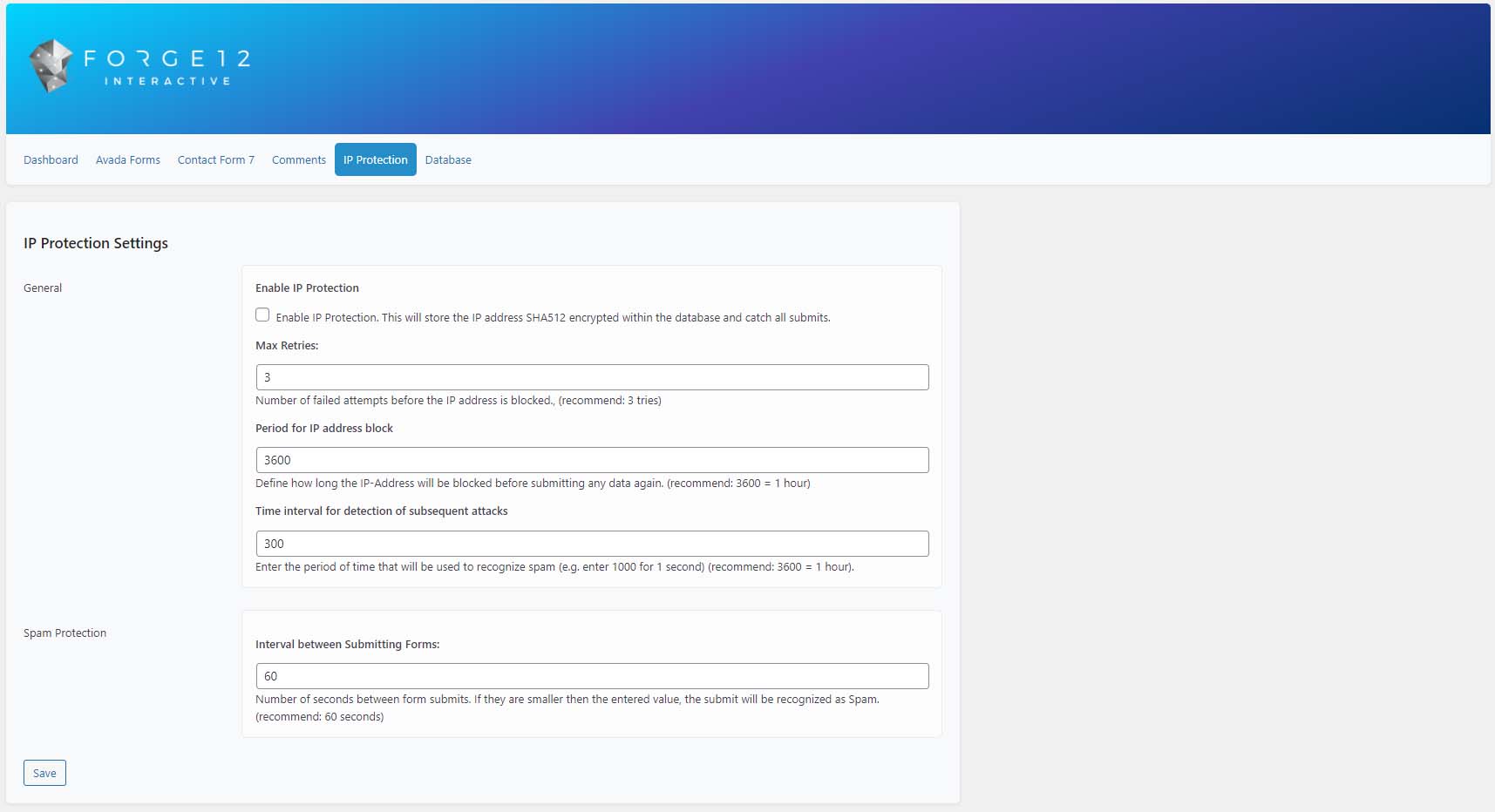
IP Protection 
Comments Settings 
Contact Form 7 Settings 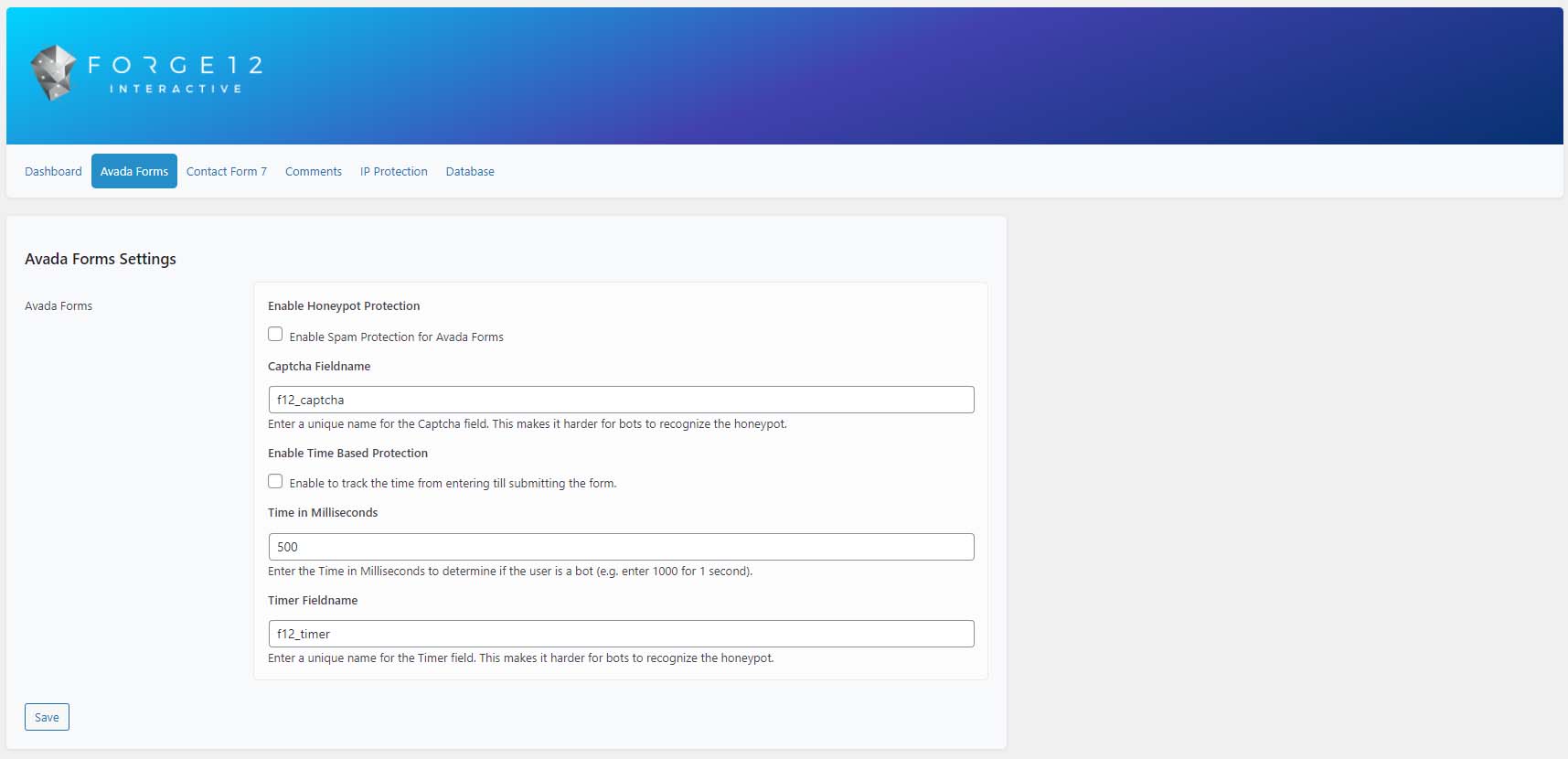
Avada Forms Settings 
Image Captcha 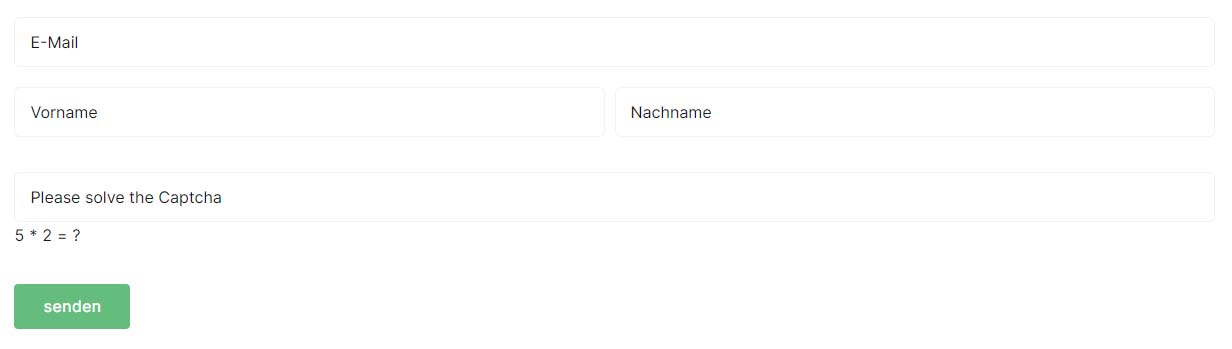
Arithmetic Captcha 
Honeypot Captcha
Instalación
- Upload the plugin to the “/wp-content/plugins/” directory.
- Activate the plugin through the “Plugins” menu in WordPress.
- Customize the Settings within the Dashboard.
If you have any further questions do not hesitate to ask.
Preguntas frecuentes
-
Will this stop all spam messages?
-
Probably not. But it should reduce it.
-
Is it GDPR ready?
-
Yes, the plugin does not set any cookies nor does it send any data to external servers. All required data is stored in your database. The IP based
spam protection uses a one way encryption to protect the website from bots. The used keys for the encryption will be recreated every 2 month.
The stored, encrypted data will be removed automatically every 2 month. -
Do I need coding skills?
-
No, everything can be managed from the WordPress Dashboard. Just enable the required functions and enjoy it.
Reseñas


Colaboradores y desarrolladores
Este software es de código abierto. Las siguientes personas han contribuido a este plugin.
Colaboradores
"Captcha/Honeypot (CF7, Avada, Elementor, Comments, WPForms) – GDPR ready" ha sido traducido a 2 idiomas locales. Gracias a los traductores por sus contribuciones.
Traduce "Captcha/Honeypot (CF7, Avada, Elementor, Comments, WPForms) – GDPR ready" a tu idioma.
¿Interesado en el desarrollo?
Revisa el código, echa un vistazo al repositorio SVN o suscríbete al registro de desarrollo por RSS.
Registro de cambios
1.12.1
- Hotfix: Fixed a bug causing the system to throw a 500 Server Error if a large amount of entries already exist.
1.12.0
- New: Added WP Cron for Log Entries
- New: Added Option to delete all Log Entries at once within the UI/Database Settings
1.11.92
- Hotfix: Fixed bug causing the wp-cron stop running the cleaning task.
1.11.7
- Hotfix: Fixed a bug causing an error in PHP 8.2 while checking for referrers.
- Hotfix: Fixed the honeypot field (hidden => text)
1.11.5
- Hotfix: Fixed a bug causing the honeypot to fail validation even if correct. (e.g. WooCommerce Registration)
1.11.4
- Hotfix: Security hotfix
1.11.2
- Fix: Updated Code to work with Ultimate Member 2.6.7
- Rename: CF7Captcha.php to f12-cf7-captcha.php
- Fix: Updated Domain to captcha-for-contact-form-7
- New: Added JavaScript Validation to Ultimate Member
1.11.0
- Update: Changed code to be compatible with PHP 7.0.
- Fix: Issue fixed causing the math captcha to not reload correctly.
- Fix: Javascript and Browser Validation are activated after the captcha protection for the specific module (e.g. CF7) has been activated.
1.10.0
- New: Added Captcha, JavaScript, Rule & Browser Validation support for Gravity Forms.
- Fix: Updated Spelling in WPForms JavaScript Validation.
- Update: Updated the default settings to support Gravity Forms settings.
1.9.1
- Fix: The settings are now saved correctly on WordPress multisites.
1.9
- New: WPForms Support added
1.8.1
- Fix: Fixed a bug causing elementor to throw an error. (Uncaught TypeError: array_merge())
1.8
- Fix: Fixed a JavaScript bug in Avada Forms.
- New: Added Browser Validation for Avada Forms
- New: Added Javascript Validation for Elementor, Avada, CF7, Comments, WordPress Login, WordPress Backend
1.7.2.1
- Fix: Hotfix for image reload – Reload icon has been removed on reload for image captchas
1.7.2
- Fix: Hot fix for Timers.
1.7.1
- New: Added verified Message to submitted Avada Forms
- New: Added additional logging information (Timer, Header)
- New: Added Log data for verified Elementor submissions
- Fix: Fixed a bug with Comment Validation causing the comment to break
- Fix: Fixed a bug with Login Validation
- Fix: Adjusted Elementor Honeypot field
1.7
- New: Reload for Image & Math Captcha
1.6.6
- Fix: Fixed the domain mapping for the language.
- Fix: Fixed a bug causing the blacklist not to save after editing.
1.6.5
- New: Changed the default value for the greedy filter to 0 in the general settings.
1.6.4
- New: Simplified the UI for Setting up the Captchas – You can now set up everything with just 3 clicks for your complete website.
- New: Added german translation for the Plugin and Pot Files. The Plugin can now be translated within wordpress (LocoTranslate, WPML …)
1.6.3
- Beta: Added position option for avada forms (before or after submit button).
1.6.2
- Fix: WooCommerce Registration Page Settings fixed
- New: Filter ‘f12-cf7-captcha-get-form-field-honeypot’ added to customize the honeypot captcha field.
- New: Filter ‘f12-cf7-captcha-get-form-field-image’ added to customize the image captcha field.
- New: Filter ‘f12-cf7-captcha-get-form-field-math’ added to customize the arithmetic captcha field
1.6
- New: Added support for the Ultimate Member Plugin Registration & Login Form
- Fix: Fixed a issue with contact form 7 not adding the global captcha field correct if the submit button has been customized.
- New: Added hook to WordPress Login Authentication, allowing to change the validation status before the error messages is generated. (f12_cf7_captcha_login_login_validator)
1.5.1
- New: Added captcha protection option for WordPress registration (Arithmetic, Honeypot & Image)
- New: Added captcha protection option for WooCommerce registration (Arithmetic, Honeypot & Image)
- New: Added captcha protection option for WooCommerce login (Arithmetic, Honeypot & Image)
- New: Added Arithmetic & Image Captcha for CF7 (global)
- New: Added Arithmetic & Image Captcha for Avada Forms (global)
- New: Added Arithmetic & Image Captcha for WordPress Comments (global)
- New: Added Arithmetic & Image Captcha for WordPress Login (global)
- Fix: Fixed some minor bugs on validation mechanics.
- Update: Added code optimizations and improvements.
- Fix: Spelling mistakes fixed in the logs and ui.
- Update: Renamed WordPress Login to WordPress within the UI Menu.
1.5
- Fix: The CF7 time based protection will now take the correct name from the settings (before it took the name of the avada form time based protection)
- Fix: Spelling mistakes fixed in the logs.
- New: Added the option to enable the multiple submission protection for contact form 7.
- New: Added the option to rename the honeypot field for contact form 7.
- New: Added the option to enable the multiple submission protection for avada forms.
- New: Added the option to enable the multiple submission protection for elementor forms.
- Update: Updated the plugin settings ui.
1.4.94
- New: Added Honeypot & Filter Protection for Avada Contact Templates.
1.4.93
- Fix: Updated the “ungreedy” function of the blacklist filter.
- New: Added a description to the greedy/ungreedy checkbox in the blacklist options.
1.4.92
- Fix: Contact Form 7 error message added for empty captcha fields.
1.4.91
- Fix: Updated syntax for honeypot on Elementor causing an unexpected line break on columns.
1.4.9
- New: Added Arithmethic & Image Captcha for Elementor Forms
1.4.8
- New: Added Elementor Support – if Elementor is installed the Captcha/Honeypot can be activated for all Elementor forms.
1.4.7
- New: Added the option to enable greedy search for blacklisted words. For example, is the word “train” is blacklisted and the greedy function is enabled, this will not block “trainstation”. If you disable the greedy function “trainsation” will also be blocked.
1.4.6
- New: Added Log System tracking all messages (verified and spam). This will help to find false positive submissions.
- Fix: Removed comment reply validation for users with the capabilities “edit_comment” and “moderate_comments”
- Update: Moved Filters from Dashboard to a new Filter section in the Settings for the Captcha
1.4.5
- Update: WordPress 6.0 compatibility
- New: Multiselect compatibility.
1.4.4
- Update: Added CSS for Toggle
- Update: Added Toggle.js
1.4.2
- Update: Adjusted Readme, added FAQ.
1.4.1
- New: Added customizable error message for rules – only CF7 and Comments for the moment.
- New: Added Rules to Avada – default error message will be displayed at the moment.
1.4
- New: WordPress Login Captcha integration
- Fix: Fixed a bug with the Timer when the Timer Field did not reload after Spam submitting a form which stopped the form to be submitted again.
1.3
- New: Add the Option to add a Honeypot Field global for Contact Form 7
- New: Captchas are now reloading after mails sent
- Update: Changed the IP Timer / Ban Logic.
- New: Added custom rules to check fields (Links, BBCode, Blacklist).
- New: Added Blacklist, which will use the default WordPress Discussion List. Keywords can be loaded async.
- Remove: Removed CF7 missing notice.
1.2.1
- Update: Minor Captcha Style Updates
1.2
- Update: Code Optimizations
- New: Added IP Based Spam Protection – IP Addresses are stored as SHA512 encrypted string with including a custom salt in the database.
- New: Added Salt System for IP Addresses. This will generate a new Salt every month to increase the IP Address Protection
- New: Added timer to define the minimum time that needs to be elapsed between 2 form submits.
- New: Added IP Bans for recognized and repeated Spam submits from the same IP Address. Times and Retries are customizable within the settings.
- New: Added additional Database options to clean or empty tables manually.
- New: Added the option to rename the fieldnames given for the captcha and timer fields to increase the difficult for bots.
- Update: Added additional Avada, Comments and CF7 compatibility.
1.1
- New: Additional spam protection for Comments and CF7 by setting a custom time value which will be used to submit the form.
- New: Added Comments / Discussion spam protection
- New: Added Database options to manually clean database entries
1.0
- Initial commit