Descripción
Hide prices for logged-out users, or hide your whole store until customers log in. Perfect for private, B2B and wholesale stores.
Features
- Hide prices for guest users
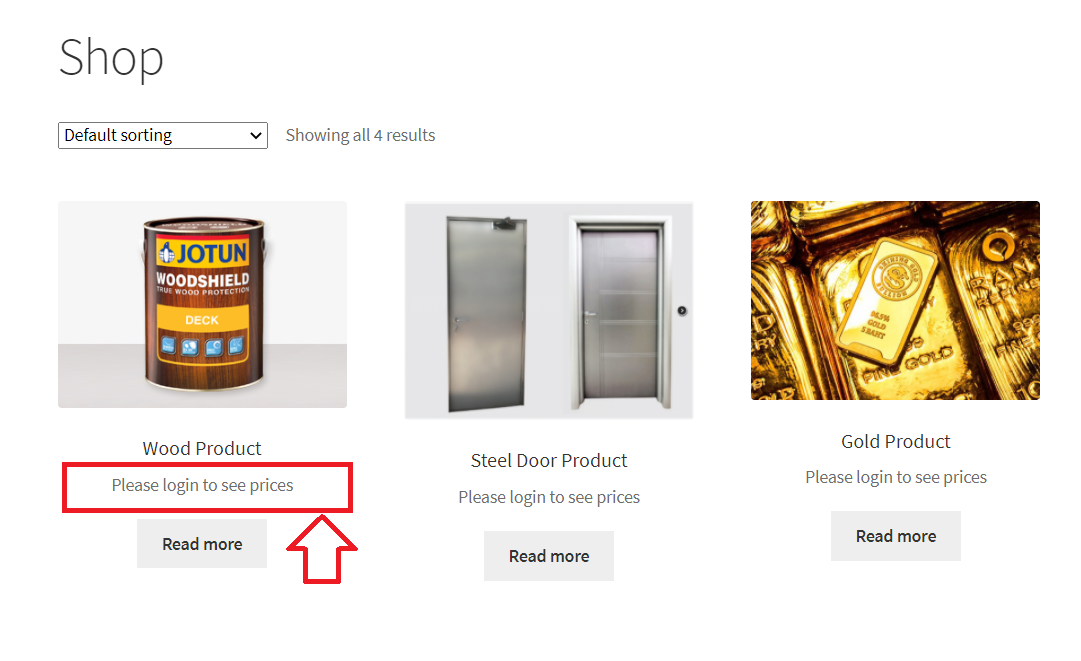
- Show a message such as “Log in to view prices” instead of the price
- Hide the add to cart button and prevent checkout
- Customize the message, including links
- Force users to log in to view the store
Who is it for?
- Wholesale and B2B stores that only show prices to registered customers
- Members-only stores where pricing is a benefit of having an account
- Private stores, such as company, staff or club shops that shouldn’t be public
B2BKing Pro: The Complete WooCommerce B2B & Wholesale Solution
This plugin is the free private store module of B2BKing, the highest rated WooCommerce B2B and wholesale plugin: 4.95/5 stars from 216+ reviews, powering 15,000+ stores.
B2BKing Pro includes everything in this plugin, plus 130+ features for running a wholesale, B2B or hybrid B2B + B2C store.
New to B2B selling? Read our complete guide to WooCommerce B2B stores.
Advanced Private Store & Product Visibility
How to hide prices in WooCommerce
- Hide prices for specific products only
- Replace prices with quote requests for logged-out users
- Hide the shop and products completely
- Hide specific products or categories from certain user groups or individual users
Wholesale Prices & Customer Groups
Complete guide to WooCommerce wholesale prices
- Organize customers into groups with their own prices, discounts and rules
- Show both retail and wholesale prices to business users
- Configure amount or percentage discounts for each group
- Import and export wholesale prices in bulk via CSV
Tiered Pricing
Learn more about tiered pricing & price tables
- Set different prices based on the quantity ordered
- A tiered pricing table is generated automatically and adapts to any theme
- The current price is highlighted as customers change the quantity
Customer-Specific Pricing
Learn more about customer-specific pricing
- Set negotiated prices for individual customers, no extra groups or rules needed
- Set a regular price, sale price and quantity tiers for each customer and product
- Each customer only sees their own prices once logged in
B2B Registration & Approval
- Separate B2B and B2C registration forms, with manual or automatic approval
- 9 types of custom fields, such as company name, VAT number or file upload
- Automatically validate EU VAT numbers via VIES
Quote Requests & Offers
Learn more about quote requests
- Customers can request quotes for specific products and quantities
- Negotiate through built-in conversations and messaging
- Reply with purchasable offers, also sent as branded PDFs
Minimum & Maximum Order Rules
Complete guide to minimum order amounts & quantities
- Set minimum and maximum order quantities or values
- Apply them to the whole order, specific categories or specific products
- Set different rules per group, e.g. B2C minimum $50, B2B minimum $1,000
- Enforce package quantities, e.g. products sold in boxes of 6
B2B Payments & Tax
How to enable Net 30 payment terms in WooCommerce
- Invoice and purchase order payment methods for B2B customers
- Enable or disable payment and shipping methods for each group
- Tax exemptions by group or country, optionally based on a validated VAT number
- Show prices excluding tax to B2B users and including tax to B2C users
Bulk Ordering & Company Accounts
- Wholesale bulk order form with product search by name or SKU
- Quick orders via CSV upload and reusable purchase lists
- Subaccounts for employees, with permissions and order approval
B2B Only, or B2B + B2C Together
How to sell both B2B and B2C with WooCommerce
- Dedicated modes for B2B-only stores and hybrid B2B + B2C stores
- Business prices and features are shown to B2B users only
- Can be added to an existing store without affecting current customers
👉 Get B2BKing – The Ultimate WooCommerce B2B & Wholesale Plugin
Want wholesale prices for free? Try B2BKing Core, our free wholesale plugin on WordPress.org.
Capturas
Instalación
- Go to Plugins > Add New, search for “Private Store B2BKing”, then click Install Now and Activate. Or upload the plugin zip under Plugins > Add New > Upload Plugin.
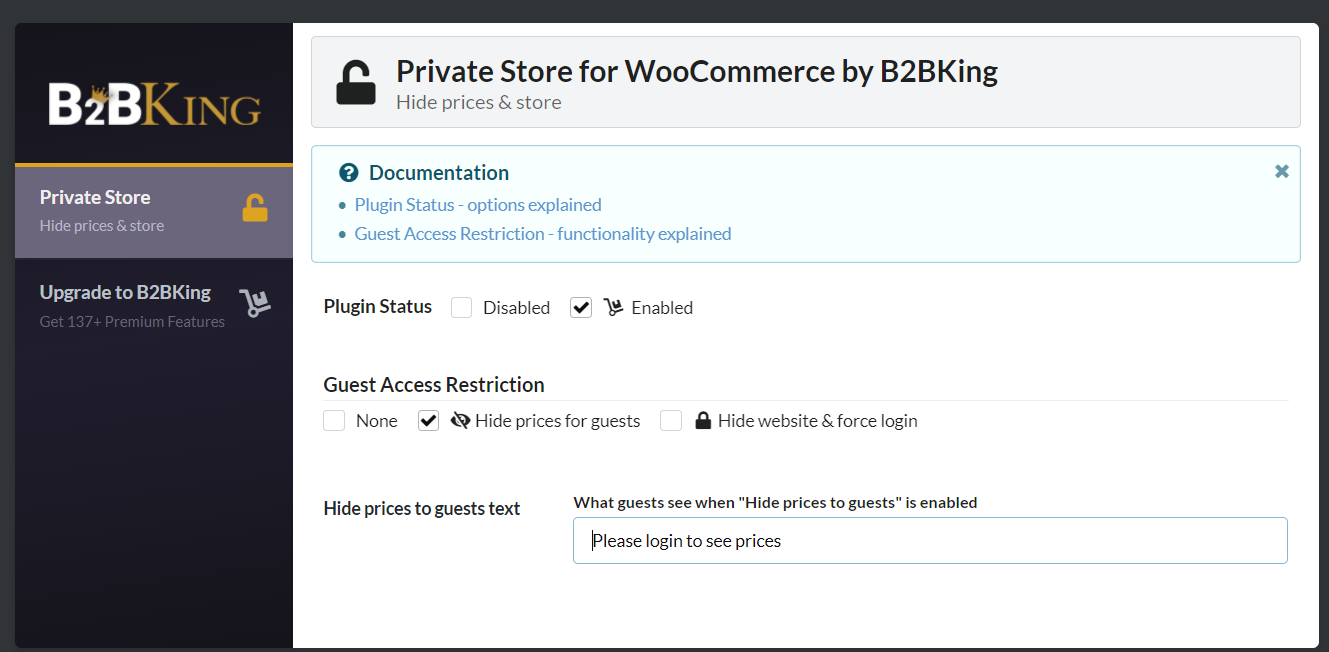
- Go to B2BKing > Private Store in your WordPress admin.
- Set the plugin status to Enabled.
- Under Guest Access Restriction, choose “Hide prices for guests” or “Hide website & force login”.
- Optionally, change the message guests see instead of prices.
Preguntas frecuentes
-
How do I hide prices until login in WooCommerce?
-
Activate the plugin, go to B2BKing > Private Store, enable it and choose “Hide prices for guests”. Logged-out visitors will see your message instead of prices.
-
Can I show a “Log in to view prices” link?
-
Yes. You can write your own message and include a link, for example to your My Account page, where customers can log in or register.
-
Yes. When prices are hidden, guests can’t add products to the cart or check out.
-
How do I make my WooCommerce store private or members only?
-
Choose “Hide website & force login”. Logged-out visitors are sent to the login page before they can see the store.
-
Will logged-in customers still see prices?
-
Yes. Prices are only hidden from logged-out visitors.
-
Can I hide prices only for some products, categories or user roles?
-
Not in this free plugin, which hides prices for all guests. B2BKing Pro lets you hide prices for specific products, and control prices and visibility for each customer group.
-
That’s available in B2BKing Pro, which lets guests request quotes instead of seeing prices.
-
Does it work with B2BKing Pro?
-
B2BKing Pro already includes all of these features, so you don’t need both. If B2BKing Pro is active, this plugin won’t activate, which avoids conflicts.
-
Is WooCommerce required?
-
Yes. This plugin requires WooCommerce.
Reseñas
No hay reseñas para este plugin.
Colaboradores y desarrolladores
Este software es de código abierto. Las siguientes personas han contribuido a este plugin.
Colaboradores
Traduce “Private Store & Hide Prices for WooCommerce – B2B & Wholesale by B2BKing” a tu idioma.
¿Interesado en el desarrollo?
Revisa el código, echa un vistazo al repositorio SVN o suscríbete al registro de desarrollo por RSS.
Registro de cambios
1.2.2
- Security: prices are now also hidden from guests in the WooCommerce Store API, product variation data, structured data (JSON-LD) and block theme page data
- Security: “Hide website completely” now also blocks guest access through the REST API and WooCommerce AJAX requests
- Security: settings are now sanitized and validated when saved
- Fix: Shop Managers can now save the plugin settings
- Fix: conflict with B2BKing Core, which shared the plugin status and settings tab options
- Fix: the plugin now pauses itself with a notice when B2BKing Pro is active, regardless of plugin load order
- Fix: direct file access is now blocked
1.2.1
- Tested with WooCommerce 11.3
- Improved readme and documentation
1.0.0
- Initial release